Couple Eye Photo Trend: Create a Romantic AI Couple Selfie with 2 Photos
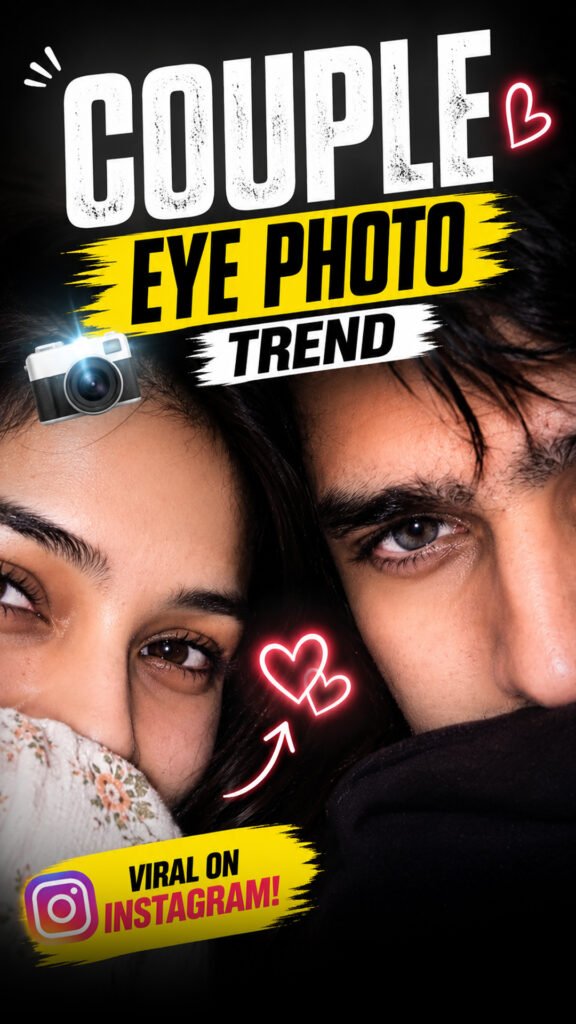
Want to create a cute and romantic photo with your partner using AI? The Couple Eye Photo Trend is a fun way to turn two separate photos into one romantic couple selfie.
You only need two photos: one of yourself and one of your partner. Upload both photos to ChatGPT or another AI image editor, add the prompt, and let AI create the image.
The best part is that you don’t need to take a new photo together. AI uses both photos to create a close-up selfie with a romantic eye-to-eye look. The final image can look like a real photo taken on a phone.
You can use this trend to create a cute picture with your boyfriend, girlfriend, husband, or wife. You can also share the result on Instagram Stories, WhatsApp Status, or other social media platforms.
Couple Eye Photo Trend Prompt (Copy and Paste)
Prompt
Use 100% of both uploaded faces. Create an ultra-realistic iPhone front-camera flash selfie with only the upper half of both faces visible, pressed closely together. Preserve exact facial features, natural skin texture, pores, slight imperfections, messy hair, warm hazel-brown eyes, and realistic reflections. Low-light indoor setting with authentic iPhone flash, subtle motion blur, sensor noise, HDR, shallow depth of field, imperfect framing, and raw smartphone camera artifacts. Add a tiny and between both faces. Vertical 9:16, looks like a genuine accidental Instagram Story photo—completely photorealistic, unedited, no beauty filter, no AI look, no plastic skin, no oversharpening.
Upload both face photos and paste the complete prompt into your AI image editor.
Make sure you use both photos as identity references. This helps the AI understand the faces you want to include in the final image.
For the best result, use clear photos where both faces are easy to see.
What Is the Couple Eye Photo Trend?
The Couple Eye Photo Trend is an AI photo trend where two separate face photos are used to create one romantic couple image.
You don’t need to stand next to your partner or take a selfie together. You can upload one photo of each person and ask AI to bring both people into the same image.
The main idea is to create a close-up photo where the couple’s eyes and faces are the focus. The image can have a soft, romantic look, like a candid selfie taken on a smartphone.
This trend is great for couples who want to create a new photo together without using an actual couple picture.
The final result depends on the quality of your photos and the prompt you use. Sometimes, you may need to try again to get a better match.
How to Create the Couple Eye Photo Trend with AI
Follow these simple steps to create your own couple eye photo.
Step 1: Open ChatGPT
First, open ChatGPT or another AI image editor that supports photo uploads and image creation.
Choose the image creation feature if it is available in your account.
Step 2: Upload Your Photo
Upload a clear photo of yourself.
Make sure your face is easy to see. A front-facing photo with good lighting can help the AI understand your facial features.
Step 3: Upload Your Partner’s Photo
Now, upload a clear photo of your partner.
Try to use a photo where their face is also easy to see. Avoid blurry images or photos where the face is covered.
You should now have two separate photos ready to use.
Step 4: Copy and Paste the Prompt
Copy the complete Couple Eye Photo Trend prompt from the section above.
Paste it into the AI image editor after uploading both photos.
The prompt tells the AI how to use the two faces and what kind of romantic image you want to create.
Step 5: Ask AI to Use Both Faces
Make sure the AI uses both uploaded photos as face references.
The first photo should guide the appearance of the first person, and the second photo should guide the appearance of the second person.
This can help the AI create an image that looks closer to both people. However, the result may not match every facial detail perfectly.
Step 6: Create a Vertical Image
If you want to share the image on Instagram Stories or Reels, ask for a vertical 9:16 image.
This shape fits a phone screen well and gives you more space for a full-screen story.
Step 7: Generate Your Couple Photo
Now, click the Generate button or send your prompt.
Wait for the AI to create the image. When it is ready, check both faces carefully.
If the result looks good, save the image and share it with your partner.
Tips to Get the Best Couple Eye Photo
Want your AI couple photo to look more real? Follow these simple tips.
Use Clear Face Photos
Choose photos where both faces are easy to see. Clear photos can help the AI understand each person’s appearance.
Avoid Heavy Filters
Try to use natural photos without too many filters. Strong filters can change the look of your face and may affect the final result.
Use Good Lighting
Photos taken in good light can show facial details more clearly. Avoid very dark photos or images with strong shadows across the face.
Upload Both Photos Correctly
Make sure you upload both photos before generating the image. If one photo is missing, the AI may not include both people as expected.
Try Again If the Faces Look Different
Sometimes, AI may change the eyes, nose, lips, or other facial details.
If this happens, try using clearer photos and repeat the prompt. You can also make the instructions about keeping both faces close to the reference photos more specific.
Can You Make This AI Couple Photo on Your Phone?
Yes, you can try this trend on your phone if your chosen AI image editor supports photo uploads and image creation.
Open the tool in its app or browser, upload both photos, paste the prompt, and generate the image.
You do not need a professional camera. A clear photo taken with your phone can work well.
The available features may depend on the tool and your account.
Can You Share the Couple Eye Photo on Instagram?
Yes, you can share your AI-generated couple photo on Instagram Stories, posts, or other social media platforms.
You can also use it as a WhatsApp Status or send it directly to your partner.
Before sharing, check that both faces look right and that you are happy with the final image. It is also a good idea to get your partner’s permission before uploading or sharing their photo.
Frequently Asked Questions (FAQs)
What Is the Couple Eye Photo Trend?
It is an AI photo trend that uses two separate face photos to create one romantic couple selfie.
How Many Photos Do I Need?
You need two photos: one of yourself and one of your partner.
Can I Use ChatGPT to Create This Photo?
You can try ChatGPT if image creation and photo uploads are available in your account.
Can I Use This Trend with My Boyfriend or Girlfriend?
Yes, you can use your photo and your partner’s photo to try this trend.
Why Do the Faces Look Different?
AI may change some facial details while creating the image. Clear photos and a detailed prompt can help, but an exact match is not always guaranteed.
Which Image Size Is Best for Instagram Stories?
A vertical 9:16 image is a good choice for Instagram Stories because it fits the phone screen.
Final Words
The Couple Eye Photo Trend is a simple and fun way to create a romantic AI photo using just two pictures.
You don’t need to take a selfie together. Just upload your photo and your partner’s photo, paste the prompt, and let AI create a new image.
Use clear photos, follow the steps, and try again if the first result does not look right.
Try this Couple Eye Photo Trend and create your own romantic AI couple selfie! ❤️