Nostalgic Birthday Photo Trend: Create an Emotional AI Birthday Memory with ChatGPT
What if you could bring your childhood memories and present-day moments together in one beautiful photo? 🥹
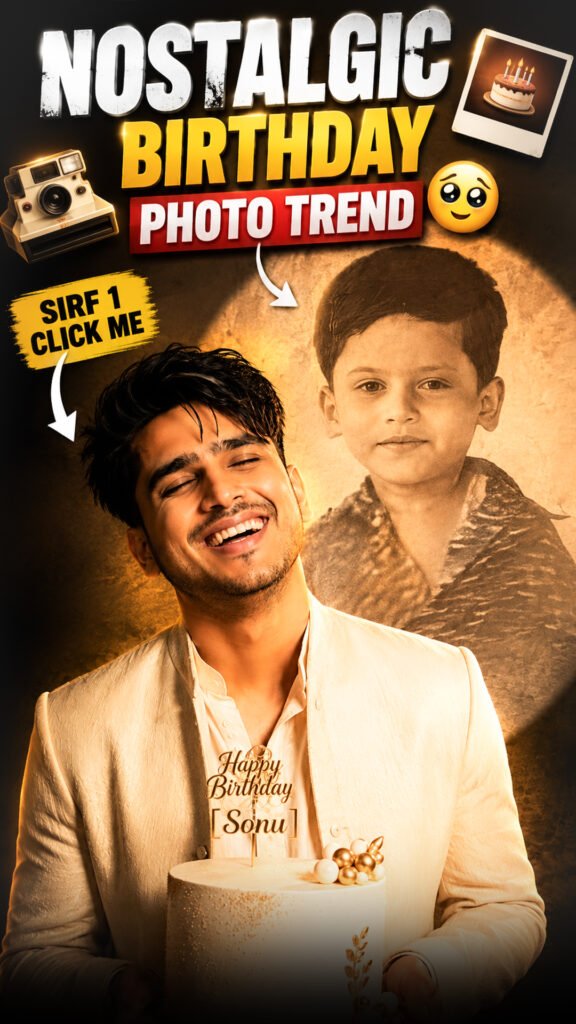
The Nostalgic Birthday Photo Trend is a creative AI photo trend that combines your childhood photo and current photo into one emotional birthday scene.
With the help of ChatGPT, you can create a cinematic picture showing your younger self and present-day self together. It can look like a beautiful memory where two different stages of your life meet in one frame.
The best part is that you only need two photos to try this trend: one from your childhood and one recent photo.
Nostalgic Birthday Photo Trend Prompt 🎂
Prompt
Create an ultra-realistic cinematic birthday poster, vertical 9:16. Use the 1st uploaded photo as the present-day person and the 2nd uploaded photo as their childhood version. Keep the facial identity accurate and clearly make both versions the same person.Show the present-day person in an elegant cream/ivory birthday outfit, happily holding a beautiful white cake with gold details and a “Happy Birthday [NAME]” topper. They are laughing naturally with eyes closed, cinematic pose, soft flowing hair/clothing.Behind them, create a large circular spotlight on a dark studio wall containing their faded vintage childhood photo, slightly transparent with warm sepia tones and old-photo texture. Add realistic cinematic shadows, warm soft lighting, DSLR photo.Adapt outfit, hairstyle and styling naturally for the person’s gender. No extra people, no watermark, no text except the cake topper.
How to Create the Nostalgic Birthday Photo Using ChatGPT
Follow these simple steps to create your emotional birthday picture.
Step 1: Open ChatGPT
Open ChatGPT on your mobile phone or computer. Make sure image upload and image generation features are available in your account.
Step 2: Upload Your Childhood Photo
Choose a childhood photo that you want to use in your birthday memory.
Try to select a clear picture where your face is easy to recognise.
Step 3: Upload Your Present-Day Photo
Now upload a recent photo of yourself.
Choose a high-quality picture with good lighting so AI can understand your current appearance.
Step 4: Copy the Prompt
Copy your complete Nostalgic Birthday Photo Trend prompt from the section above.
Step 5: Paste the Prompt into ChatGPT
Paste the prompt along with both uploaded photos.
Make sure the instructions tell ChatGPT to use the childhood photo and present-day photo as separate identity references.
Step 6: Generate Your Birthday Image
Ask ChatGPT to create the nostalgic birthday scene using both photos.
Wait for the image to finish generating and check how naturally the two versions of you appear together.
Step 7: Customise Your Birthday Scene
Want a different birthday style? You can change the background or theme in your instructions.
For example, try a simple birthday room, a beautiful cake setup, warm fairy lights, or a cinematic celebration scene.
Step 8: Create a Vertical Image
If you want to share your image on Instagram Reels or Stories, request a 9:16 vertical composition.
What Makes the Nostalgic Birthday Photo Trend Special?
This trend is special because it brings two different stages of your life into one picture.
Instead of using two separate photos, AI combines your childhood and present-day appearance into a single birthday scene.
Here are some details that make this trend beautiful:
- Childhood memories: Include your younger self in the picture.
- Present-day appearance: Show how you look today.
- Emotional birthday scene: Bring both versions together in a birthday setting.
- Birthday cake: Add a beautiful cake to make the scene more meaningful.
- Cinematic lighting: Use soft light and natural shadows.
- Realistic composition: Make both versions look like they are part of the same moment.
The final image can become a special memory to share on your birthday or save for yourself.
Tips to Get a Realistic Nostalgic Birthday Photo
Follow these tips to improve your AI-generated image.
1. Choose Clear Photos
Use childhood and present-day photos where your face is clearly visible. Avoid very blurry or heavily edited pictures.
2. Upload Both Photos Separately
Make sure ChatGPT can understand which photo shows your childhood and which one shows your current appearance.
3. Preserve Both Versions of Your Face
Ask AI to keep the facial features of both photos as close to the original references as possible.
4. Choose a Simple Birthday Background
A simple birthday setup can help both versions of you remain the main focus.
5. Keep the Lighting Consistent
Ask for matching light, shadows, and colours so both versions look like they belong in the same scene.
6. Check the Final Image
AI may sometimes change facial details, clothing, or body proportions. Review the final image carefully.
7. Try Different Birthday Themes
You can experiment with different cake designs, decorations, backgrounds, and lighting styles.
Creative Ideas for Your Nostalgic Birthday Photo
Want to make your picture more personal? Try these birthday scene ideas.
1. Childhood Meets Present Day
Show your younger self and present-day self sitting together at a birthday table.
2. Birthday Cake Memory
Create a scene where both versions of you are sitting together with a birthday cake.
3. Dreamy Birthday Room
Use soft lighting, balloons, fairy lights, and simple decorations for an emotional birthday atmosphere.
4. Cinematic Birthday Portrait
Create a professional-looking portrait with dramatic lighting and a beautiful birthday background.
5. Minimal Birthday Celebration
Keep the background simple and focus on the two versions of yourself.
Frequently Asked Questions (FAQs)
1. What is the Nostalgic Birthday Photo Trend?
It is an AI photo trend that combines your childhood photo and present-day photo into one emotional birthday picture.
2. How many photos do I need?
You need two photos: one childhood photo and one recent photo of yourself.
3. Can I create this image using ChatGPT?
Yes, if image upload and image generation are available in your ChatGPT experience. Upload both photos and provide the required instructions.
4. Can AI keep my childhood face the same?
AI can use your childhood photo as a reference, but exact identity preservation is not guaranteed. A clear original photo may help.
5. Can I change the birthday background?
Yes. You can choose a birthday room, cake setup, party decoration, or any other background you like.
6. Can I share this image on Instagram?
Yes. You can share it as an Instagram post, Story, or Reel cover. Request a 9:16 vertical composition for Stories and Reels.
Final Words
The Nostalgic Birthday Photo Trend is a beautiful way to bring your childhood memories and present-day life together in one frame.
With two photos and ChatGPT, you can create an emotional birthday picture that reminds you how far you have come.
Try this trend, create your own childhood memory, and share it with your friends and family! 🥹❤️