Blur Aesthetic Photo Trend: Create a Dreamy AI Photo Edit
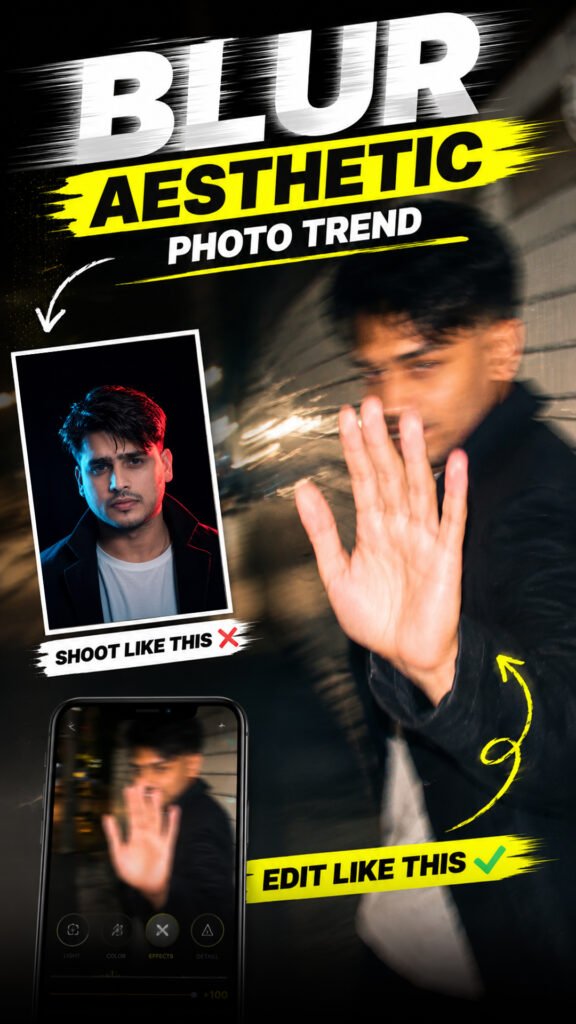
Have you seen those dreamy, blurry, and aesthetic photos on Instagram? These photos have a soft cinematic look that makes ordinary pictures feel more creative and beautiful.
Now, you can create a similar effect using AI. You can transform your normal photo into a dreamy image with soft motion blur, cinematic depth, and a beautiful atmosphere.
The best part is that you do not need professional photo-editing skills. You can upload your photo to ChatGPT, describe the look you want, and let AI help you create the edit.
In this guide, you will learn how to create the Blur Aesthetic Photo Trend, improve your results, and make your image ready for social media.
Blur Aesthetic Photo Trend Prompt:
Prompt
Ultra-realistic candid smartphone photo, 1080×1920 (9:16). Use the uploaded image only as inspiration for general facial proportions and vibe. Create a fully original, non-identifiable subject.Night: Quiet Tokyo sidewalk beside a white ceramic tile wall. The subject walks past the camera, turns back in surprise, raises one hand to block the lens, shy smile, mid-step, half-profile, slightly out of frame.Style: Handheld phone, harsh flash, strong camera shake, heavy motion blur, facial smearing, ghosting, noisy, imperfect framing, dark surroundings, raw accidental snapshot.Negative: anime, illustration, CGI, studio lighting, sharp focus, cinematic, editorial, smooth skin, posed, identity match, face copy, real person replication.
What Is the Blur Aesthetic Photo Trend?
The Blur Aesthetic Photo Trend is a photo-editing style that uses soft blur, motion effects, and cinematic lighting to create a dreamy appearance.
Instead of looking like a normal photo, the edited image has a more artistic and atmospheric feel.
Depending on the style you choose, the effect can include soft background blur, a sense of movement, gentle lighting, and a dreamy colour tone.
Some versions keep the face sharp while adding blur around the person. Others use a slightly blurred effect across the whole image to create a more artistic look.
This style is popular with people who want to give their everyday photos a creative appearance for Instagram, profile pictures, Stories, and other social media posts.
How to Create the Blur Aesthetic Photo Trend Using ChatGPT
Follow these simple steps to transform your photo.
Step 1: Open ChatGPT
Open ChatGPT on your phone or computer.
Make sure your account has access to image upload and image editing or generation features.
Step 2: Upload Your Photo
Upload the photo you want to edit.
You can choose a selfie, portrait, mirror selfie, outdoor photo, or another picture you want to give a dreamy look.
For better results, start with a clear, high-quality image.
Step 3: Describe the Blur Aesthetic Effect
Explain the style you want ChatGPT to create.
You can ask for a dreamy aesthetic look with soft motion blur, cinematic depth, gentle lighting, and a beautiful atmosphere.
If you want your face to remain clear, specifically ask for the face to stay sharp while the background and surrounding areas have a soft blur effect.
Step 4: Generate the Edited Image
Ask ChatGPT to edit your uploaded photo according to your instructions.
The AI will attempt to transform the image while applying the requested visual effects.
Once the image is ready, check whether the blur looks natural and whether the overall photo matches your preferred style.
Step 5: Adjust the Blur Effect
If the result is too sharp, ask for a slightly stronger dreamy blur.
If the image looks too blurry, ask ChatGPT to reduce the blur and keep the important facial details clear.
You can also request softer lighting, a more cinematic atmosphere, or a subtle motion effect.
Step 6: Save Your Final Image
Once you are happy with the result, save the edited image.
You can now use it as an Instagram post, Story, profile picture, or another social media visual.
Different Blur Aesthetic Styles You Can Try
There are several ways to create a dreamy blur effect. Try these styles to find the one that suits your photo.
1. Dreamy Soft Blur
This style uses gentle blur and soft lighting to create a calm, dreamy appearance.
It works well for portraits, selfies, and photos with a simple background.
2. Cinematic Motion Blur
Motion blur creates the feeling that something is moving in the image.
You can use it to give your photo a more cinematic and energetic appearance. For a portrait, ask the AI to keep the face clear while adding subtle movement to the surroundings.
3. Background Blur
This style keeps the main subject sharp while making the background softer.
It helps draw attention to the person in the photo and gives the image more depth.
4. Night-Time Blur Aesthetic
You can try a dreamy blur effect with night-time lighting, soft highlights, and a cinematic atmosphere.
This look can work particularly well for city photos, street portraits, and pictures with lights in the background.
5. Vintage Dreamy Blur
A vintage-inspired blur effect can give your photo a nostalgic appearance.
You can ask for soft focus, gentle colours, subtle film grain, and a warm atmosphere.
6. Romantic Soft-Focus Effect
This style uses gentle blur and soft lighting to create a romantic appearance.
It can work well for couple photos, portraits, and special memories.
Tips for Getting Better Blur Aesthetic Photos
Follow these tips to make your edited photos look more natural.
Use a High-Quality Photo
Start with a clear image so the AI can identify the important details.
A blurry original photo may make it harder to preserve facial features during editing.
Keep the Face Sharp
If you want a portrait-style image, ask the AI to keep the eyes and main facial features clear.
A sharp face combined with a soft background can create a more balanced aesthetic effect.
Do Not Overuse Blur
Too much blur can hide important details and make the photo look artificial.
Start with a subtle effect and increase it gradually until you get the look you want.
Choose the Right Lighting
Soft lighting can help create a dreamy atmosphere.
You can ask for gentle highlights, natural shadows, and balanced exposure instead of extremely bright or dark lighting.
Preserve Your Original Appearance
If you want the edited photo to look like you, ask the AI to preserve your facial features, skin tone, expression, and identity.
Always check the result because AI editing may change some details.
Experiment With Different Effects
You can try different combinations of motion blur, background blur, soft focus, and cinematic lighting.
Make small changes each time so you can compare the results and find your favourite style.
How to Make Your Blur Aesthetic Photo Ready for Instagram
After generating your image, check how it will look on social media.
Here are a few things to consider:
- Instagram post: Use a suitable crop that keeps the main subject visible.
- Instagram Story: A vertical 9:16 image can work well.
- Profile picture: Keep your face or main subject easy to recognise.
- Reels cover: Make sure the important parts of the photo remain visible in the preview.
If the generated image does not have the right dimensions, crop it using your preferred photo-editing app.
Avoid adding too many extra effects if you want to maintain a clean, dreamy look.
Can You Create the Blur Aesthetic Photo Trend on Your Phone?
Yes, you can try this trend on your phone if your ChatGPT account supports the necessary image features.
You do not need a computer or advanced editing software.
Simply upload your photo, explain the blur effect you want, generate the edited image, and adjust the result if needed.
The available features and results may vary depending on your account and the image-editing tools available to you.
Frequently Asked Questions
1. What is the Blur Aesthetic Photo Trend?
It is a photo-editing style that uses soft blur, motion effects, and cinematic lighting to create a dreamy and artistic appearance.
2. Can I create the Blur Aesthetic Photo Trend using ChatGPT?
Yes, you can try it using ChatGPT if image upload and image editing or generation features are available in your account.
3. Can I keep my face sharp while blurring the background?
Yes. You can ask the AI to keep your face and eyes clear while applying a soft blur to the background and surrounding areas. The result may vary.
4. Why does my edited photo look too blurry?
The blur effect may be too strong. Ask the AI to reduce the blur and preserve important details, especially around the face and eyes.
5. Can I use this effect on a couple photo?
Yes. You can try a soft-focus or dreamy blur effect on a couple photo. If you want both people to remain recognisable, ask the AI to preserve both faces.
6. Can I use the edited photo on Instagram?
Yes. You can share the edited image on Instagram or other social platforms. Make sure you are allowed to use the original photo, especially if it includes someone else.
7. Does this trend require professional editing skills?
No. You can describe the effect you want in simple language and let the AI help with the editing. You may need a few attempts to get your preferred result.
Final Words
The Blur Aesthetic Photo Trend is a simple way to give your ordinary pictures a dreamy and cinematic appearance.
With AI, you can experiment with soft motion blur, background blur, gentle lighting, and other creative effects without needing advanced editing skills.
Upload your favourite photo to ChatGPT, describe the look you want, and try different variations until you find a result you love.
Keep the effect natural, preserve the important details, and create an aesthetic photo you can share on social media.