Create Shah Rukh Khan’s Iconic Don Look with AI: Google Flow Video Tutorial
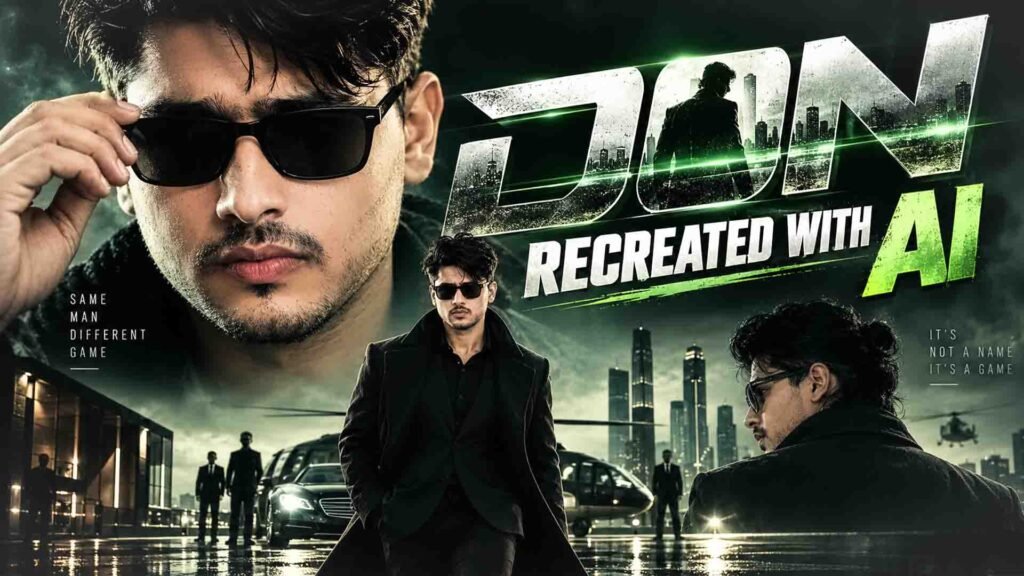
Do you remember Shah Rukh Khan’s iconic Don look? His stylish appearance, intense expressions, and powerful screen presence made Don one of Bollywood’s most memorable characters.
But what if you could create a similar cinematic action video using your own photo?
With AI video generation tools like Google Flow, you can try transforming your normal photo into a dramatic Bollywood-inspired action scene.
You can upload your photo as a reference and use a detailed prompt to create stylish character shots, dramatic camera movements, moody lighting, and action-movie visuals.
You can experiment with different outfits, backgrounds, and cinematic effects to create a video for Instagram Reels, YouTube Shorts, and other social media platforms.
Let’s see how to create your own Don-inspired cinematic AI video using Google Flow.
Don-Inspired Cinematic AI Video Prompt
VIDEO PROMPT 1
CINEMATIC HERO ENTRY — PART 1Duration: 10 secondsAspect Ratio: 16:9Frame Rate: 120fps cinematic, with subtle 90–120 fps slow-motion during hair/wind momentsVisual Style: premium theatrical Indian action-film hero entry, anamorphic primes, extremely shallow depth of field, organic film grain, occasional warm lens flare, golden-hour warmth, saturated jungle greens, creamy ivory highlights, deep filmic shadows.STRICT CHARACTER REFERENCE — GEMINI AVATAR:Use the user’s uploaded Gemini Avatar/reference image as the PRIMARY and STRICT identity reference for the HERO.The HERO must remain exactly the same person as the reference image throughout this entire video and must match the same person in Video 2.Preserve with maximum consistency:– Exact facial identity and facial structure– Same eyes, eyebrows, nose, lips and jawline– Same skin tone and natural skin texture– Same beard/stubble pattern and mustache– Same hairstyle adapted only into the specified messy shoulder-length black hair + man-bun look– Same natural masculine appearance– No face replacement– No beautification– No facial redesign– No age change– No identity drift– No different person between shotsHERO WARDROBE — LOCKED:tanned natural skin, shoulder-length black hair tied in a messy man-bun with loose wind-blown strands, groomed stubble beard with mustache and goatee, black rectangular sunglasses with polished silver/metallic temple arms, olive-brown open-collar button shirt, cream/off-white linen blazer draped naturally over the shoulders, matching cream linen trousers, gold wristwatch, cigarette.The wardrobe, sunglasses, hairstyle, beard and accessories must remain identical throughout both videos.LOCATION:Tropical Southeast-Asian river delta — mangrove jungle, limestone karst cliffs, rustic wooden stilt pier/dock, thatched-roof hut, camo netting, rope railings, stacked wooden cargo crates, green river water and a white luxury motor yacht.SHOT 1 — 00:00–00:02EXTREME CLOSE-UP — FRONTAL.Open directly on the lower half of the HERO’S face. His fingers grip the rim of his black rectangular sunglasses and smoothly slide them upward off his eyes. Frame focuses sharply on his lips, mustache and groomed stubble beard. He gives a subtle, controlled smirk.Background completely melts into creamy white and green cinematic bokeh.Micro handheld camera drift.Natural skin pores and realistic facial texture.No artificial plastic skin.SHOT 2 — 00:02–00:04EXTREME CLOSE-UP — RIGHT PROFILE.Macro profile from behind-right of the HERO.Ear, cheekbone, nose bridge and mustache remain sharply defined.The polished silver metallic temple arm of the black sunglasses catches a warm sunlight glint.Loose strands of his long black hair move naturally across frame in slow motion.Soft tropical green jungle bokeh behind him.Maintain exact Gemini Avatar facial identity.SHOT 3 — 00:04–00:08LOW-ANGLE MEDIUM CLOSE-UP — OVER-THE-SHOULDER FROM BEHIND.Camera positioned low behind the HERO’S outstretched bare forearm/brown shirt sleeve, filling the left foreground.Cream linen blazer naturally draped over his shoulder.His head remains in right profile.Messy man-bun clearly visible.Black sunglasses remain on his face.Cigarette casually dangling from his lips.He slowly raises his hand toward the cigarette and casually flicks it.Gold wristwatch catches sunlight.Blazing white backlit sky and sun-flared green hillside behind him.Loose hair strands whip naturally in the wind.Premium cinematic motion blur.SHOT 4 — 00:08–00:10WIDE SHOT — DARK HUT INTERIOR.Cut to a dim rustic thatched-roof stilt hut.A WATCHMAN sits behind a rough wooden railing in silhouette, wearing a dark brown fedora/trilby hat and dark charcoal shirt.His facial identity is intentionally not visible.He exhales a thin plume of cigarette smoke.Blown-out daylight enters through the open walls.Hanging oil lamp, cloth bag and scale pan gently sway.Camo netting visible underneath the thatched roof.Camera remains mostly static with subtle environmental movement.AUDIO:Low bass hero-theme drone begins in Shot 1.Soft sunglasses movement.Subtle tropical wind.Hair flutter whoosh.Cigarette inhale/exhale.Low hero-theme bass pulse enters by Shot 3.Distant river-water ambience.Wooden hut creaks.At the end, faint sound of a boat engine beginning to start.CONTINUITY:End Video 1 naturally from the dark hut interior so Video 2 can continue seamlessly from this environment.Do not change the HERO’S face, outfit, hairstyle, beard, sunglasses or accessories.”
VIDEO PROMPT 2
CINEMATIC HERO ENTRY — PART 2Duration: 10 secondsAspect Ratio: 16:9Frame Rate: 120 fps cinematic, with subtle 90–120fps slow-motion during hair movement and the final turnVisual Style: premium theatrical Indian action-film hero entry, anamorphic primes, extremely shallow depth of field, organic film grain, occasional warm lens flare, golden-hour warmth, saturated jungle greens, creamy ivory highlights, deep filmic shadows.STRICT CHARACTER REFERENCE — GEMINI AVATAR:Use the user’s uploaded Gemini Avatar/reference image as the PRIMARY and STRICT identity reference for the HERO.This is the SAME HERO from Video 1.Do not regenerate or reinterpret his identity.Preserve exactly:– Same facial identity and facial structure– Same eyes, nose, lips, jawline and facial proportions– Same skin tone and natural skin texture– Same groomed stubble beard, mustache and goatee– Same shoulder-length black hair and messy man-bun– Same loose wind-blown hair strands– Same black rectangular sunglasses with polished silver metallic temple arms– Same olive-brown open-collar shirt– Same cream/off-white linen blazer– Same matching cream trousers– Same gold wristwatch– Same cigarette– Same age and body proportionsNo identity drift, no face morphing, no beautification, no different actor, no wardrobe change.LOCATION CONTINUITY:Continue in the SAME tropical Southeast-Asian river delta environment from Video 1.Mangrove jungle, limestone karst cliffs, rustic wooden stilt pier, thatched hut, camo netting, rope railings, cargo crates, green river water and white luxury yacht.Maintain identical golden-hour lighting direction and cinematic color grade.SHOT 5 — 00:10–00:12OVER-THE-SHOULDER FROM BEHIND THE FEDORA WATCHMAN.Camera is behind the dark silhouette of the WATCHMAN.Reveal a white luxury motor yacht cruising toward the rustic wooden pier across green river water.Foreground contains stacked wooden cargo crates on pallets, rope railings and weathered dock planks.Dense mangrove forest stretches across the background beneath bright sky.Camera performs a subtle slow pan tracking the approaching yacht.Water naturally moves and reflects warm sunlight.The WATCHMAN remains only a dark silhouette.SHOT 6 — 00:12–00:14LOW-ANGLE MEDIUM-FULL HERO SHOT.Cut outside to the SAME HERO standing confidently against jungle-covered limestone karst cliffs and bright white sky.Full figure visible.Cream linen blazer, matching cream trousers, olive-brown shirt and black sunglasses remain exactly the same.Long black hair tied in messy man-bun with loose strands moving in the wind.Gold wristwatch visible.He slowly lowers his hand away from his sunglasses and flicks/points two fingers forward in a controlled, confident swagger gesture.Chin slightly raised.Strong heroic silhouette.Warm sunlight creates subtle lens flare around his shoulders.SHOT 7 — 00:14–00:16MEDIUM CLOSE-UP THROUGH STRUCTURE.Frame the SAME HERO between weathered wooden posts and hanging ropes of the hut.A blurred wooden beam crosses the foreground for cinematic depth.He begins walking slowly forward.Cold, controlled expression behind dark sunglasses.Long hair flows naturally over the cream blazer.Green jungle bokeh behind him.Camera tracks subtly with his movement.Fabric of the linen blazer moves naturally in the wind.SHOT 8 — 00:16–00:18CLOSE-UP TRACKING SHOT — FRONTAL.Smooth cinematic tracking camera moves backward as the HERO walks directly toward camera with controlled swagger.Shoulders naturally sway.Long black hair and stubble beard catch warm rim light.Black sunglasses reflect blurred green foliage.Face remains perfectly consistent with the Gemini Avatar reference.Extremely shallow depth of field.Natural realistic skin texture.Premium anamorphic lens characteristics and organic film grain.SHOT 9 — 00:18–00:20MEDIUM SHOT — OVER-THE-SHOULDER TURN.The HERO pauses while walking.He slowly turns his head back over his shoulder toward camera in dramatic slow motion.His sunglasses catch a subtle reflection of the bright jungle.Behind him: sun-flared wooden dock, coiled ropes and beige canvas canopy.Warm golden lens flare blooms naturally across the frame.Hair strands move in slow motion.He locks his gaze toward camera through the sunglasses.Hold the final pose for a brief cinematic beat.End with a powerful cinematic cut to black.AUDIO:White yacht diesel engine approaching.Water slapping naturally against the hull.Rope creaks and dock ambience.Hero-theme bass pulse continues.Confident footsteps begin in Shot 7.Jungle birds and wind ambience.Fabric rustle.Percussion gradually builds.Final turn receives a dramatic cinematic whoosh/sting and full hero-theme bass impact.CUT TO BLACK.CONTINUITY:This video must look like the direct continuation of Video 1.The HERO is the exact same person from the Gemini Avatar reference and Video 1.No changes to face, hairstyle, beard, sunglasses, clothing, watch, body proportions or overall appearance.”
How to Create a Don-Inspired AI Video Using Google Flow
Step 1: Open Google Flow
First, open Google Flow and sign in with your Google account.
Go to the video generation section and check the available options.
Choose a workflow that supports image-to-video or reference-image generation. The available features may depend on your account and selected AI model.
Step 2: Upload Your Photo
Now upload a clear, high-quality photo of yourself.
Choose an image where your face is clearly visible and the lighting is natural.
If you want to create a full-body cinematic entry, a full-body reference photo can be helpful. It gives the AI more information about your clothing, body proportions, and overall appearance.
You can also ask the AI to keep your original facial features, hairstyle, skin tone, and body proportions as close to the reference photo as possible.
Step 3: Add the Don-Inspired Cinematic Prompt
After uploading your photo, paste the prompt from the section above into the Google Flow prompt box.
Your prompt should describe the cinematic action-film look you want to create.
You can include details such as:
- A stylish black tailored suit
- A confident character appearance
- Intense facial expressions
- Dramatic low-angle camera shots
- Moody cinematic lighting
- Realistic shadows and atmospheric effects
- Smooth slow-motion camera movement
These details can help the AI understand the visual style you want.
For example, you can use this general Don-inspired cinematic prompt:
Example Prompt:
“Create a cinematic Bollywood-inspired action scene using the uploaded photo as the visual reference for the main character. Preserve the person’s recognizable facial identity, hairstyle and natural body proportions. Show the character wearing a sophisticated black tailored suit, standing confidently in a dramatic urban environment at night. Use moody cinematic lighting, realistic shadows, subtle atmospheric haze, a slow camera push-in and a powerful low-angle hero shot. Maintain natural body movement, realistic clothing details and a polished action-film aesthetic.”
This is a general cinematic action prompt inspired by the style of Don. You can customize the outfit, background, camera movement, and character actions according to your idea.
Step 4: Generate Your AI Video
Once your photo and prompt are ready, check the available generation settings and click the Generate button.
Google Flow will try to create a cinematic video using your reference image and instructions.
After the video is generated, carefully review the result.
Check these details:
- Does the character look like your original photo?
- Does the outfit look natural?
- Are the facial expressions realistic?
- Is the camera movement smooth?
- Does the scene have the desired cinematic feel?
If the face changes or body movements look unnatural, refine your prompt and generate another version.
You can also experiment with different camera angles, lighting styles, and backgrounds to find your favourite result.
Step 5: Edit and Export Your Final Video
Once you get a result you like, save it using the available export option.
You can open the video in CapCut or another video editor for final editing.
To make your video more cinematic, try adding:
- Dramatic background music
- Action movie sound effects
- Cinematic colour grading
- Smooth transitions
- Slow-motion effects
For Instagram Reels and YouTube Shorts, a vertical 9:16 video format is a useful choice.
Before publishing, check the video quality, facial consistency, audio, and overall presentation.
Tips for Better Don-Inspired AI Videos
Follow these simple tips to improve your results:
- Use a Clear Reference Photo: Upload a sharp image with your face clearly visible.
- Choose the Right Outfit: A black formal suit can help create a stylish action-film look.
- Describe Camera Movements: Mention slow camera push-ins, low-angle shots, or tracking shots.
- Use Cinematic Lighting: Try moody lighting, realistic shadows, and subtle background haze.
- Keep Movements Natural: Avoid adding too many complicated actions in one short video.
- Check Facial Details: AI may change some facial features, so review the final result carefully.
- Try Different Variations: Experiment with different scenes and camera angles to find the best output.
Frequently Asked Questions (FAQs)
1. Can I create a Don-inspired video using my own photo?
Yes. You can upload your photo to Google Flow and use a cinematic action prompt to create a Don-inspired character video.
2. Can I create this AI video using Google Flow for free?
Google Flow access, features, and generation limits may vary depending on your account, region, and available plan.
3. Can AI keep my original face in the video?
AI can use your uploaded photo as a visual reference and try to preserve your facial identity. However, exact face preservation is not guaranteed in every generated frame.
4. Do I need a full-body photo?
A full-body photo is helpful if you want to create a full-body character entry or action scene. For close-up cinematic shots, a clear portrait photo may be enough.
5. Can I upload this video to Instagram Reels and YouTube Shorts?
Yes. You can edit your generated video in CapCut and prepare it for Reels or Shorts. Make sure you have the necessary rights for any music or other copyrighted material you use.
Final Words
Creating a Bollywood-inspired action video with AI is a fun way to transform your normal photo into a cinematic character scene.
With Google Flow, you can experiment with stylish outfits, dramatic lighting, powerful camera angles, and action-film visuals.
Just upload your photo, add the prompt from the section above, and create your own Don-inspired cinematic video!