AI Face Shape Ke Hisab Se Best Hairstyle
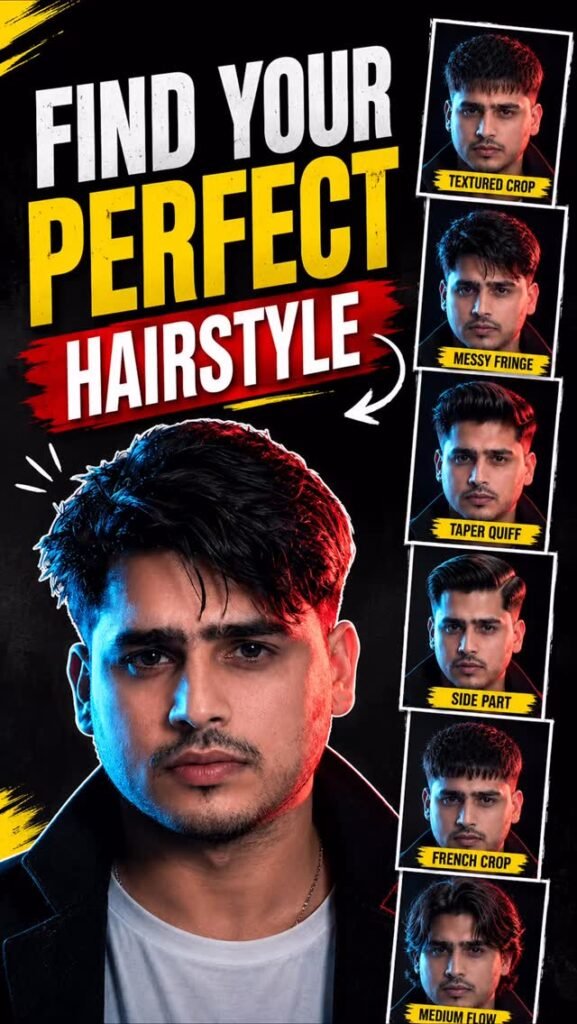
Want to find out which hairstyle will look best on your face? Choosing a new haircut can be confusing, especially when you do not know which style will suit you.
Now, you can use AI to get hairstyle recommendations based on your facial proportions. Simply upload your photo to Google Gemini and ask it to suggest hairstyles that may suit your face shape.
AI can help you explore different looks, understand why certain hairstyles may work for you, and even create hairstyle previews so you can compare them before visiting a barber or hairstylist.
In this guide, you will learn how to use AI to find suitable hairstyles, understand different face shapes, and explore new looks before getting a haircut.
AI Face Shape Hairstyle Prompt
Prompt
Analyze my uploaded face photo and recommend the 6 best modern hairstyles.FACE LOCK (Highest Priority)Use my uploaded face as the exact facial reference. My face must remain 100% identical in every hairstyle preview. Do NOT change my face shape, forehead, eyes, eyebrows, nose, lips, jawline, skin tone, facial proportions, expression, or clothing. Only the hairstyle should change.Generate a clean 2×3 hairstyle board with these styles:1. Textured Crop Fade2. Low Taper + Messy Fringe3. Mid Taper Quiff4. Classic Side Part5. Modern French Crop6. Medium FlowUse the same camera angle, lighting, background, and pose in every image.Minimal text only:• Face Shape• Hair Type• Best Hair Length• Hairstyle NamesUltra-realistic, premium barbershop consultation board, photorealistic, no beauty enhancement, no AI-looking face.
What Is AI Face Shape Hairstyle Analysis?
AI face shape hairstyle analysis is a way to use artificial intelligence to explore hairstyles that may suit your facial proportions.
Different people have different face shapes. Some have oval faces, while others have round, square, rectangular, heart-shaped, or diamond-shaped faces.
Hairstyles can change how these facial proportions appear. For example, a hairstyle with extra height on top can create a different visual effect from one with more volume around the sides.
AI can examine the visible features in your uploaded photo and suggest hairstyles based on the proportions it identifies.
Depending on the tool and its available features, it may also generate images showing how different hairstyles could look on you.
However, AI recommendations are only suggestions. Your hair texture, hairline, hair density, personal style, and maintenance preferences also matter when choosing a haircut.
How to Find the Best Hairstyle for Your Face Shape Using Gemini
Follow these simple steps to explore hairstyles using Google Gemini.
Step 1: Open Google Gemini
Open Google Gemini on your phone or computer.
Make sure you have access to the image upload and other features required for your task.
Step 2: Upload a Clear Photo
Upload a clear photo of yourself.
For better results, choose a photo where your face is easy to see. A front-facing picture with good lighting can help the AI examine your visible facial proportions.
Avoid photos with heavy filters, strong shadows, or objects covering your face.
Step 3: Copy Your Prompt
Copy the complete AI Face Shape Hairstyle prompt from the section above.
The prompt should instruct Gemini to examine your facial proportions and recommend hairstyles that may suit you.
Step 4: Paste the Prompt Into Gemini
Paste the prompt into the same conversation where you uploaded your photo.
Make sure your instructions ask for both hairstyle recommendations and explanations for why those styles may suit your face.
Step 5: Check Your Face Shape Analysis
Gemini may suggest a face shape based on your uploaded photo.
Common face shapes include oval, round, square, rectangular, heart-shaped, and diamond-shaped.
Remember that face shapes do not always fit neatly into one category. Your result may depend on the camera angle, lighting, hairstyle, and how clearly your facial outline is visible.
Treat the analysis as a starting point rather than a definite measurement.
Step 6: Review the Recommended Hairstyles
Read the hairstyle recommendations carefully.
The AI may suggest different hair lengths, cuts, or styles based on your facial proportions.
Check the explanation for each recommendation so you can understand why a particular style might suit your appearance.
Step 7: Generate Hairstyle Previews
If Gemini does not automatically generate hairstyle previews, ask it to create them.
You can request separate previews of the recommended hairstyles using your original photo as the reference.
This can help you compare the different looks before deciding which one you prefer.
Step 8: Compare the Results
Look at each hairstyle and consider more than just your face shape.
Think about whether the style suits your personal taste, whether it works with your natural hair texture, and how much time you want to spend styling it.
Choose a hairstyle that you feel comfortable wearing in real life.
Step 9: Show Your Favourite Look to Your Hairstylist
Save the AI-generated preview you like most.
Show it to your barber or hairstylist and explain which parts of the hairstyle you want to recreate.
They can help you understand whether the style will work with your current hair length, hairline, and natural hair texture.
Different Face Shapes and Hairstyles to Explore
Understanding your face shape can help you explore a wider range of hairstyles. Here are some common face shapes and styles you can consider.
1. Oval Face Shape
An oval face is generally longer than it is wide, with a gently rounded outline.
People with this face shape may be able to explore many different hairstyles.
Hairstyles to try:
- Textured crop
- Classic side part
- Medium-length layers
- Slick back
- Soft waves
The best choice will depend on your hair texture, personal style, and preferred maintenance routine.
2. Round Face Shape
A round face often has a similar width and length, with softer angles around the cheeks and jaw.
Some people prefer hairstyles that add height on top or create a more elongated visual appearance.
Hairstyles to try:
- Textured quiff
- Pompadour
- High-volume top with shorter sides
- Long layers
- Side-swept styles
You can ask AI to compare different variations and see which one you prefer.
3. Square Face Shape
A square face often has a relatively broad forehead and a defined jawline.
Some people like hairstyles that highlight these features, while others prefer softer shapes.
Hairstyles to try:
- Crew cut
- Textured crop
- Classic side part
- Short layered hair
- Soft, medium-length waves
Your preferred look and natural hair texture can help you decide between these options.
4. Rectangular or Oblong Face Shape
A rectangular face is generally longer than it is wide.
Some hairstyles with volume around the sides can create a more balanced visual appearance.
Hairstyles to try:
- Side-swept fringe
- Medium-length layered hair
- Textured fringe
- Soft waves
- Styles with moderate side volume
Avoid assuming that one style is automatically unsuitable. The overall haircut and your personal preferences matter more than a strict rule.
5. Heart-Shaped Face
A heart-shaped face often has a wider forehead and a narrower chin.
Depending on your features, you may want to explore hairstyles that balance the appearance of the forehead and lower face.
Hairstyles to try:
- Side-swept hairstyles
- Textured fringe
- Medium-length layers
- Chin-length bob
- Soft waves around the face
Try different variations to see which one feels most natural to you.
6. Diamond Face Shape
A diamond-shaped face often has more noticeable width around the cheekbones, with a narrower forehead and chin.
Hairstyles that add some volume around the forehead or create softness near the face may be worth exploring.
Hairstyles to try:
- Textured fringe
- Side part
- Medium-length layers
- Soft waves
- Layered bob
These are starting points rather than strict rules. A skilled hairstylist can help you adapt a style to your features.
Tips for Getting Better AI Hairstyle Recommendations
Follow these tips to make your hairstyle analysis more useful.
Use a Clear, Front-Facing Photo
Choose a photo where your face is visible and evenly lit.
A front-facing photo can make it easier to see your forehead, cheeks, jawline, and chin.
Avoid Heavy Filters
Beauty filters can change the appearance of your facial proportions.
Use a natural photo so the AI has a more accurate visual reference.
Ask for More Than One Recommendation
Do not settle for the first hairstyle suggested by AI.
Ask for several options, including short, medium-length, and longer hairstyles where appropriate.
Comparing different styles can help you discover looks you might not have considered.
Consider Your Natural Hair Texture
Your hair may be straight, wavy, curly, or coily. Its thickness and density can also affect how a haircut looks.
A hairstyle that looks good in an AI preview may require a different technique or styling routine in real life.
Think About Daily Maintenance
Some hairstyles need regular trimming, styling products, or daily effort to maintain their shape.
If you prefer a low-maintenance haircut, ask AI to recommend styles that are easier to manage.
Do Not Rely Only on Face Shape
Face shape is just one part of choosing a hairstyle.
Your personality, fashion preferences, hair condition, lifestyle, and comfort are also important.
Use AI recommendations to explore your options rather than treating them as fixed rules.
Can AI Show How a Hairstyle Will Look on Your Face?
Yes, some AI image tools can generate hairstyle previews using your uploaded photo as a reference.
For example, you can ask for a preview of a textured crop, a fade haircut, long layered hair, or a bob cut.
These previews can help you compare different styles without getting an actual haircut first.
However, generated images are not guaranteed to show exactly how a hairstyle will look in real life. AI may change some facial details or create hair that does not match your natural hair texture.
Always check the image carefully before using it as a reference.
Can You Use Gemini for Hairstyle Analysis on Your Phone?
Yes, you can try this method on your phone if the necessary image features are available in your Gemini account.
You do not need professional photo-editing software.
Simply upload your photo, use your prompt, review the recommendations, and ask for hairstyle previews if you want to compare different looks.
The available features may vary depending on your account and region.
Frequently Asked Questions
1. How Can AI Find the Best Hairstyle for My Face Shape?
AI can examine visible facial proportions in your photo and suggest hairstyles that may suit those features. The recommendations are estimates, not guaranteed results.
2. Can Google Gemini Analyse My Face Shape?
You can ask Gemini to assess the visible proportions of your face and suggest a possible face shape, provided the relevant image features are available. The result may not always be accurate.
3. Which Face Shape Is Best for Hairstyles?
There is no single best face shape for hairstyles. Many different hairstyles can work with each face shape, depending on hair texture, personal preferences, and styling choices.
4. Can AI Recommend Hairstyles for Both Males and Females?
Yes. You can ask AI for hairstyle recommendations based on your preferences, hair length, and the type of styles you want to explore.
5. Can AI Generate My Hairstyle Preview?
Some AI image-generation and editing tools can create hairstyle previews using your uploaded photo. The result may vary, and the available features depend on the tool you use.
6. Should I Get a Haircut Based Only on AI Recommendations?
No. Use AI suggestions as inspiration. Before getting a haircut, consider your natural hair, lifestyle, maintenance preferences, and advice from a professional hairstylist.
7. What Kind of Photo Should I Upload?
A clear, front-facing photo with good lighting and minimal filters is a useful starting point. Make sure your face is not hidden by objects or deep shadows.
Final Words
Finding a hairstyle that suits you can be difficult when you do not know which styles to explore.
With AI tools such as Google Gemini, you can get hairstyle suggestions based on your visible facial proportions and compare different looks before making a decision.
Upload a clear photo, review the recommendations, and generate previews of the styles you like.
Remember that face shape is only one factor in choosing a haircut. Your natural hair texture, personal style, and daily routine also matter.
Use AI to discover new ideas, then discuss your favourite look with your barber or hairstylist before making the final decision.