AI Building Reconstruction Video: Create a Cinematic Building Construction Video Using AI
Ab aap apni real estate building ki simple image ko AI ki help se ek cinematic construction reconstruction video mein transform kar sakte hain. 🤯🎬
Is effect mein building ko aise dikhaya jata hai jaise woh step-by-step construct ho rahi ho — starting from an empty construction scene and gradually transforming into your final building.
Ye concept real estate agents, builders, architects aur property developers ke liye especially useful hai, kyunki isse property ko ek unique aur scroll-stopping cinematic style mein showcase kiya ja sakta hai.
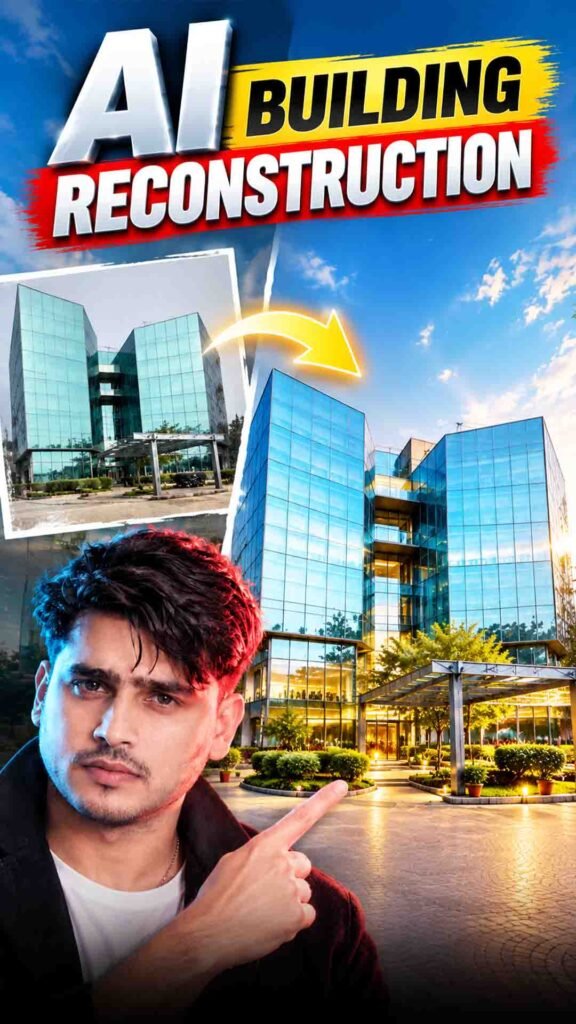
Want to transform a simple building photo into a cinematic construction video? 🤯 Now you can use AI to show your building being constructed step by step, starting from an empty construction site and gradually transforming into the final structure.
You can create this effect using ChatGPT and Google Flow without recording the actual construction process.
This trend is especially useful for real estate agents, builders, architects, and property developers who want to showcase their projects in a creative and eye-catching way.
In this guide, you will learn how to create your own AI Building Reconstruction Video step by step.
AI Building Reconstruction Video Prompt
Prompt
GRAVITY BUILD — EXTREME ONE-TAKE FPV CONSTRUCTION VFX 8–10 SECONDS | VERTICAL 9:16USE THE UPLOADED REFERENCE IMAGE AS THE FINAL ARCHITECTURAL TARGET ONLY.At 00:00 the building does not exist. Begin with an empty site matching the same location, road, surrounding buildings, trees, sky and environmental context.All construction materials are scattered throughout the site: steel, rebar, concrete, glass, façade panels, metal frames, debris and dust.The building is created entirely during one continuous shot as materials violently rise, fly around the camera and assemble into the finished architecture.ONE-TAKE CAMERA: No cuts, hidden cuts, transitions, fades, resets or time jumps.Start extremely low near the ground. Accelerate forward through the empty site. Dive toward the construction zone. As materials rise, the camera climbs with the building and performs a smooth but aggressive orbital movement.GLOBAL GRAVITY: 00:00–00:08: gravity is reversed upward. Construction materials launch upward and assemble. 00:08–00:10: gravity instantly returns to normal. Remaining dust and debris fall downward.SEQUENCE: 00:00–00:00.8: Low ground-level FPV approach. Loose gravel, dust and steel begin vibrating. 00:00–00:01.5: Gravity reverses. Materials explode upward. Rebar and steel beams shoot past the camera. Brief slow motion as a large beam passes close to the lens. 00:01.5–00:03.5: Concrete columns and floor slabs shoot upward. Floors assemble one after another. Camera rises through the emerging structure. 00:03.5–00:05.5: Fast smooth 360-degree orbital flight around the building while remaining structure assembles. 00:05.5–00:06.8: Glass panels, façade frames and exterior surfaces fly into position. Camera sweeps alongside the façade. 00:06.8–00:07.8: Entrance canopy, stairs, doors and architectural details assemble. Temporary construction elements are pulled upward and away. 00:07.8–00:08.5: Gravity returns to normal. Dust and remaining debris fall. Camera transitions from extreme speed into a smooth glide. 00:08.5–00:10: Camera pulls backward and upward into an epic architectural hero reveal. End on the exact completed building shown in the reference.CAMERA: 14mm extreme-wide FPV lens. Realistic inertia. Aggressive acceleration. Smooth orbital movement. Physical camera perspective. No digital zoom.VISUAL: Photorealistic Hollywood VFX, IMAX-scale construction, realistic concrete, steel, glass, dust and sunlight. Natural blue sky. Neutral cinematic grading. Subtle volumetric light. Realistic motion blur.AUDIO: No music. Use construction impacts, metal, concrete, glass, directional whooshes, debris and a deep gravity-reversal impact.NEGATIVE: No cuts, no static camera, no teleportation, no morphing, no melting architecture, no warped floors, no extra floors, no duplicated windows, no floating objects, no impossible physics, no CGI appearance, no excessive orange grading, no oversaturation, no text, logos or watermark.
How to Create an AI Building Reconstruction Video
Follow these simple steps to create your cinematic construction video.
Step 1: Upload Your Building Image to ChatGPT
First, open ChatGPT and upload a clear image of your building.
Choose a high-quality photo where the complete building is visible. A front-facing image with a clear background can help make the process easier.
Step 2: Remove the Building from Your Image
After uploading your photo, enter this instruction in ChatGPT:
Remove building from my image
ChatGPT will attempt to remove the building and generate an image showing the surrounding area without the structure.
This image will be used as the starting frame of your construction video.
Check the generated image to make sure the background, road, trees, and camera angle are close to the original photo.
Step 3: Open Google Flow
Now open Google Flow and sign in using your Google account.
Go to the video generation section and select Frame to Video, if this option is available in your account.
Step 4: Upload Your First Frame
Under the First Frame option, upload the building-removed image generated using ChatGPT.
This will be the starting point of your video, showing the empty construction scene.
Step 5: Upload Your Second Frame
Now select the Second Frame option and upload the original building image that you used in ChatGPT.
This image will represent the final completed building.
Both images will help guide AI from the empty scene to the finished structure.
Step 6: Add the Building Reconstruction Prompt
Copy your complete Building Reconstruction Video Prompt from the section above.
Paste it into Google Flow.
The prompt will guide AI to create a construction-style transformation with realistic building details, construction activity, and cinematic camera movement.
Step 7: Generate Your Video
After uploading both frames and adding the prompt, click the Generate button.
Google Flow will use your images and instructions to create a cinematic reconstruction video showing the building gradually appearing in the scene.
Wait for the generation to finish and review the result.
What Is an AI Building Reconstruction Video?
An AI Building Reconstruction Video is a video that shows a building transforming from an empty construction site into a completed structure.
Instead of recording the entire construction process, you can provide AI with two images:
- First Frame: An empty scene where the building has been removed.
- Second Frame: The original completed building image.
AI uses these images and your prompt to create a visual transition between the two scenes.
The generated video may include construction stages such as:
- Preparing the construction site.
- Building the foundation.
- Adding columns and structural elements.
- Constructing walls and floors.
- Installing windows and exterior details.
- Completing the final building.
These stages are AI-generated visual effects and may not represent the actual engineering or construction process.
Who Can Use This AI Building Reconstruction Trend?
This trend can be useful for many professionals.
1. Real Estate Agents
Create attractive property videos to showcase buildings to potential buyers.
2. Builders and Developers
Present completed projects through creative construction-style videos.
3. Architects
Show clients how an architectural design could look through a cinematic visual presentation.
4. Property Developers
Create engaging promotional videos for residential and commercial projects.
5. Content Creators
Make unique real estate videos for Instagram, YouTube, and other social media platforms.
Tips to Get Better AI Building Reconstruction Results
Follow these tips to improve your video quality.
- Use a clear building photo: Choose a high-quality image where the complete structure is visible.
- Keep the camera angle consistent: Both images should have similar camera positions.
- Match the background: Try to keep roads, trees, and surrounding buildings unchanged.
- Check the empty frame: Make sure the building has been removed cleanly.
- Describe construction details: Give clear instructions about how the building should appear.
- Use realistic effects: Ask for natural construction movement and believable materials.
- Review the final video: Check whether the building shape, floors, windows, and other details match the original image.
Frequently Asked Questions (FAQs)
1. What is an AI Building Reconstruction Video?
It is an AI-generated video that shows a building appearing step by step, starting from an empty construction scene and ending with the completed building.
2. Which tools do I need to create this video?
You can use ChatGPT to create the building-removed starting image and Google Flow to generate the video.
3. Do I need two images?
Yes. You need an empty construction scene as the first frame and your original building image as the second frame.
4. Can I use my own real estate building photo?
Yes. You can upload your own property image and use it as the final reference frame.
5. Can I use this video for real estate marketing?
Yes. Real estate agents, builders, architects, and property developers can use this style for promotional content and project presentations.
6. Will AI show the actual construction process?
No. AI creates a visual construction effect based on your images and instructions. The generated stages may not follow real construction methods.
7. Can I share this video on Instagram?
Yes. You can use the generated video for Instagram Reels, property promotions, and other social media platforms. Choose a vertical 9:16 format if available.
Final Words
The AI Building Reconstruction Video trend is a creative way to showcase real estate projects using AI.
With ChatGPT and Google Flow, you can transform a simple building photo into a cinematic construction video without recording the actual construction process.
Whether you are a real estate agent, builder, architect, or content creator, this technique can help make your property videos more engaging.
Try it with your own building image and create a stunning construction transformation! 🏗️🎬
GRAVITY BUILD — EXTREME ONE-TAKE FPV CONSTRUCTION VFX
8–10 SECONDS | VERTICAL 9:16

USE THE UPLOADED REFERENCE IMAGE AS THE FINAL ARCHITECTURAL TARGET ONLY.

At 00:00 the building does not exist. Begin with an empty site matching the same location, road, surrounding buildings, trees, sky and environmental context.

All construction materials are scattered throughout the site: steel, rebar, concrete, glass, façade panels, metal frames, debris and dust.

The building is created entirely during one continuous shot as materials violently rise, fly around the camera and assemble into the finished architecture.

ONE-TAKE CAMERA:
No cuts, hidden cuts, transitions, fades, resets or time jumps.

Start extremely low near the ground. Accelerate forward through the empty site. Dive toward the construction zone. As materials rise, the camera climbs with the building and performs a smooth but aggressive orbital movement.

GLOBAL GRAVITY:
00:00–00:08: gravity is reversed upward. Construction materials launch upward and assemble.
00:08–00:10: gravity instantly returns to normal. Remaining dust and debris fall downward.

SEQUENCE:
00:00–00:00.8: Low ground-level FPV approach. Loose gravel, dust and steel begin vibrating.
00:00–00:01.5: Gravity reverses. Materials explode upward. Rebar and steel beams shoot past the camera. Brief slow motion as a large beam passes close to the lens.
00:01.5–00:03.5: Concrete columns and floor slabs shoot upward. Floors assemble one after another. Camera rises through the emerging structure.
00:03.5–00:05.5: Fast smooth 360-degree orbital flight around the building while remaining structure assembles.
00:05.5–00:06.8: Glass panels, façade frames and exterior surfaces fly into position. Camera sweeps alongside the façade.
00:06.8–00:07.8: Entrance canopy, stairs, doors and architectural details assemble. Temporary construction elements are pulled upward and away.
00:07.8–00:08.5: Gravity returns to normal. Dust and remaining debris fall. Camera transitions from extreme speed into a smooth glide.
00:08.5–00:10: Camera pulls backward and upward into an epic architectural hero reveal. End on the exact completed building shown in the reference.

CAMERA:
14mm extreme-wide FPV lens. Realistic inertia. Aggressive acceleration. Smooth orbital movement. Physical camera perspective. No digital zoom.

VISUAL:
Photorealistic Hollywood VFX, IMAX-scale construction, realistic concrete, steel, glass, dust and sunlight. Natural blue sky. Neutral cinematic grading. Subtle volumetric light. Realistic motion blur.

AUDIO:
No music. Use construction impacts, metal, concrete, glass, directional whooshes, debris and a deep gravity-reversal impact.

NEGATIVE:
No cuts, no static camera, no teleportation, no morphing, no melting architecture, no warped floors, no extra floors, no duplicated windows, no floating objects, no impossible physics, no CGI appearance, no excessive orange grading, no oversaturation, no text, logos or watermark.
How To Use This Prompt
- Step 1: Apni Building Ki Image ChatGPT Mein Upload Karein
- Sabse pehle ChatGPT open karein aur apni building ki clear image upload karein.
- Image upload karne ke baad ChatGPT mein ye line enter karein:
- Remove building from my image
- ChatGPT aapki image se building ko remove karke ek clean version generate karega, jise hum video ke starting frame ke roop mein use karenge.
- Step 2: Google Flow Open Karein
- Ab Google Flow open karein aur video generation section mein jayein.
- Yahan Frame to Video option select karein.
- Step 3: First Frame Upload Karein
- Frame to Video mein 1st Frame ke option par ChatGPT se generate ki hui building-removed image upload karein.
- Ye video ka starting point hoga.
- Step 4: Second Frame Upload Karein
- Ab 2nd Frame mein wahi original building image upload karein jo aapne starting mein ChatGPT mein use ki thi.
- Isse AI ko starting scene aur final building ke beech ka transformation samajhne mein help milegi.
- Step 5: AI Prompt Add Karein
- Ab niche diya gaya Building Reconstruction Video Prompt Google Flow mein paste karein.
- Prompt ka purpose AI ko ye guide karna hai ki building ka construction realistically aur smoothly step-by-step complete ho, with cinematic camera movement and realistic construction details.
- Step 6: Video Generate Karein
- Ab Generate button par click karein.
- Google Flow aapke dono frames aur prompt ko use karke ek cinematic reconstruction video generate karega, jisme building gradually construct hoti hui final structure mein transform hogi. 🏗️🎬
Prompt Tips
- Building ki clear, high-quality image use karein.
- Original building image aur removed-building image ka camera angle same hona chahiye.
- Building ke front, surroundings aur perspective ko unnecessarily change na karein.
- First frame aur second frame ke beech maximum visual consistency rakhein.
- Construction movement ko realistic aur gradual rakhne ke liye prompt ko exactly as provided use karein.
- Better results ke liye multiple generations try karein aur sabse realistic version select karein.
- Real estate content ke liye final video ko vertical 9:16 format mein generate karna Reels ke liye useful rahega.
Example Result