Trending Couple Photo AI: Create Cinematic Couple Photos Using ChatGPT
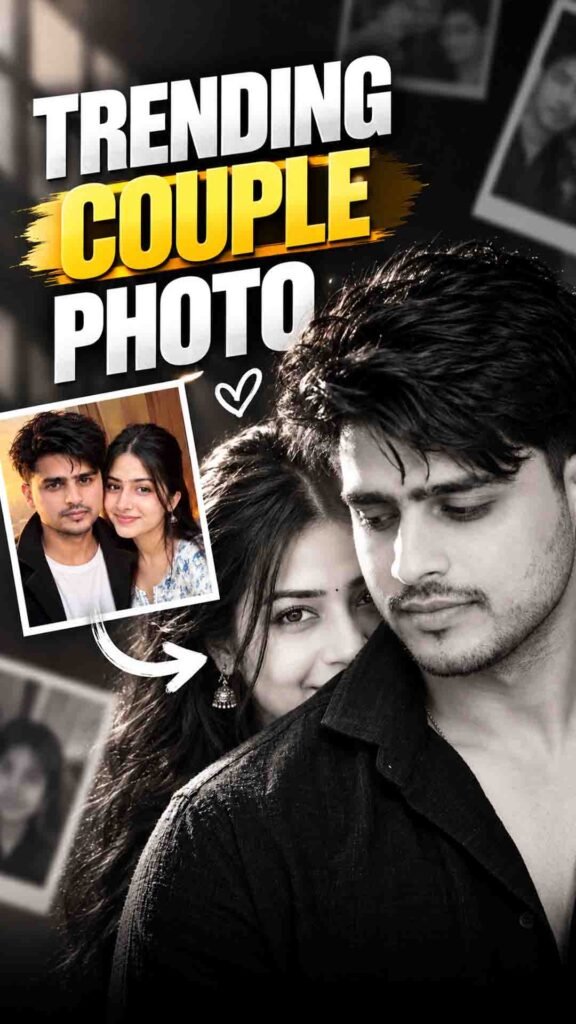
Instagram is full of beautiful cinematic couple photos. In this trend, normal couple pictures are transformed into romantic and stylish portraits using AI.
You can also create these trending couple photos with ChatGPT. You do not need any professional photo-editing software. Just upload your photos, add a suitable prompt, and let ChatGPT help you create a new couple portrait.
You can try different styles, such as romantic close-up photos, black-and-white portraits, sunset couple pictures, and luxury editorial photography.
These AI-generated photos are great for Instagram posts, Stories, profile pictures, anniversaries, and other special occasions.
Cinematic Couple Photo Prompt
Prompt
Black and white cinematic couple portrait, vertical 9:16. A young South Asian man in the foreground, framed from head to chest, positioned slightly to the right, his face turned 45 degrees toward the left, eyes lowered with a subtle peaceful smile. Thick naturally wavy dark hair, neatly groomed beard, wearing a textured black linen shirt with an open collar. Behind his left shoulder, a young South Asian woman subtly reveals half of her face, one eye fully visible and the other partially hidden by his silhouette. Her long voluminous curly hair blends naturally into the dark background. A small traditional round bindi, delicate oxidized silver jhumka, defined eyebrows and expressive kohl-lined eyes. She looks directly into the camera with a quiet, mysterious expression. Deep near-black studio background, soft diagonal window light entering from the upper left, delicate highlights along her eyes and cheekbone, dramatic chiaroscuro lighting, rich blacks, fine analog film grain, shallow depth of field. Shot on an 85mm portrait lens at f/1.8, precise focus on her visible eye, man’s profile slightly soft. Photorealistic, fine-art monochrome, cinematic editorial photography, natural skin pores and realistic facial proportions.
How to Create Cinematic Couple Photos Using ChatGPT
Step 1: Open ChatGPT and Upload Your Photos
First, open ChatGPT and start a chat with image generation support.
Upload a clear photo of yourself and your partner. Choose pictures where both faces are clearly visible. Good lighting and clear facial details can help ChatGPT understand your reference photos.
You can upload two separate photos or use an existing couple picture.
Step 2: Add the Couple Photo Prompt
After uploading your photos, paste the prompt from the section above into the chat box.
The prompt will guide ChatGPT on how to create your desired couple portrait.
You can choose different photo styles, such as:
- Black-and-white cinematic couple portraits
- Romantic close-up photos
- Sunset couple photography
- Luxury editorial portraits
- Soft and dreamy romantic pictures
You can also describe a particular viral photo style that you want to recreate.
Step 3: Keep Your Original Faces
If you want the generated photo to look like both of you, clearly ask ChatGPT to preserve your original facial features.
You can mention details such as:
- Original face shape
- Eyes, nose, and lips
- Natural skin tone
- Hair and other recognizable features
If you upload two separate photos, clearly explain which person belongs to each reference image. This can help avoid mixing up your facial features.
Important: AI may still change some facial details. Always check the final image to make sure both people look as close to their original photos as possible.
Step 4: Choose Your Couple Pose
You can customize the pose and composition of your couple photo.
For example, you can try:
- A romantic close-up pose
- A shoulder-to-shoulder pose
- A side-profile portrait
- A forehead-touching pose
- A cinematic pose with one person standing slightly behind the other
You can also describe where you want each person to stand and where they should look.
The more clearly you describe the pose, the easier it is for ChatGPT to understand your idea. However, the final pose may vary slightly.
Step 5: Select the Lighting and Photo Style
Lighting plays an important role in making your couple photo look cinematic.
Here are some styles you can try:
Black-and-White Cinematic Look: Use soft directional lighting, deep shadows, and subtle highlights for a dramatic portrait.
Romantic Sunset Look: Try warm golden-hour lighting, a soft background, and natural skin tones.
Professional DSLR Look: Ask for realistic skin texture, natural facial details, balanced lighting, and a soft background blur.
Choose a style that matches the look you want for your Instagram photo.
Step 6: Generate Your Final Couple Photo
Once you have uploaded your photos and added the prompt, ask ChatGPT to generate the image.
After the image is ready, carefully check:
- Do both faces look close to the original photos?
- Is the couple pose correct?
- Does the lighting look natural?
- Are the hands and body details realistic?
- Does the overall composition match your idea?
If something looks wrong, ask ChatGPT to correct that specific detail in the same chat.
You can also generate different versions and select your favourite couple photo.
Tips for Better AI Couple Photos
Follow these simple tips to get better results:
- Use Clear Photos: Upload high-quality pictures where both faces are easy to see.
- Avoid Heavy Filters: Natural photos can provide better facial references.
- Describe the Pose Clearly: Explain how you want both people to stand or sit.
- Choose a Suitable Background: Try a sunset, studio, or simple cinematic background.
- Mention Lighting: Describe whether you want soft, dramatic, or warm lighting.
- Check Facial Details: Always review the final image before sharing it.
Frequently Asked Questions (FAQs)
1. Can I create AI couple photos using ChatGPT for free?
You may be able to create images using ChatGPT’s available free image generation features. However, access and usage limits can vary by account and plan.
2. Can I upload two separate photos to create one couple picture?
Yes. You can upload separate photos of yourself and your partner in the same chat. Clearly explain which person is shown in each photo.
3. Can ChatGPT keep our original faces?
ChatGPT can use your uploaded photos as references and try to preserve your facial features. However, exact facial identity preservation is not guaranteed.
4. Can I create black-and-white cinematic couple photos?
Yes. Describe black-and-white photography, soft directional lighting, deep shadows, and a cinematic portrait style in your prompt.
5. Can I use these photos on Instagram?
Yes. You can use your generated couple photos for Instagram posts, Stories, profile pictures, and other creative content.
Final Words
The Cinematic Couple Photo trend is a fun way to turn your normal pictures into beautiful AI-generated portraits.
With ChatGPT, you can explore different poses, backgrounds, lighting styles, and romantic photo concepts without using complicated editing software.
Just upload clear reference photos, add the prompt from the section above, and create your own trending AI couple photo!