Instagram Viral Mirror Selfie Trend: Create a Blue LED Mirror Selfie with ChatGPT
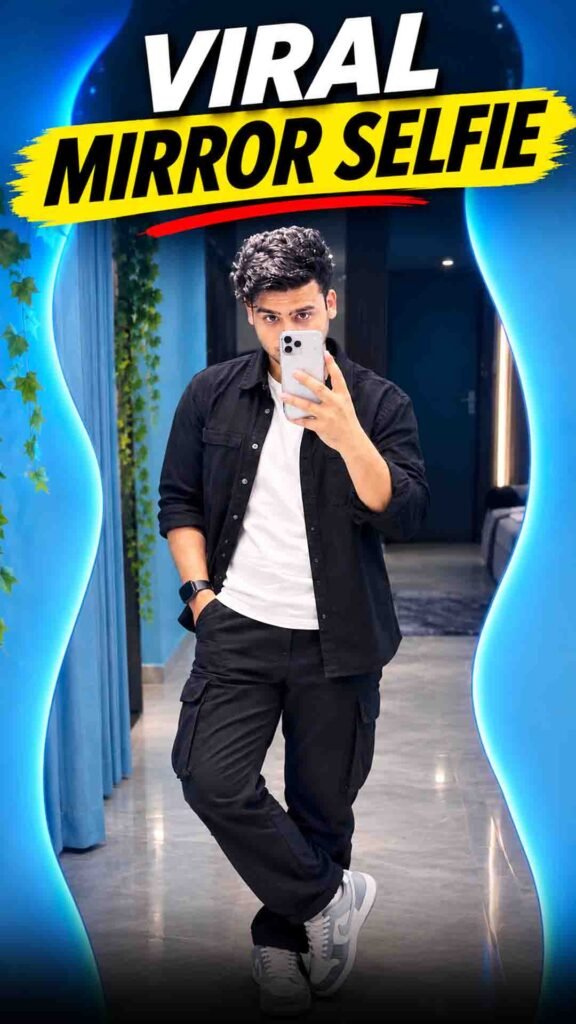
Have you seen the viral mirror selfie photos trending on Instagram? 😍 These photos feature a stylish mirror, blue LED lights, and a cool aesthetic look.
The good news is that you can try creating your own version using ChatGPT. You do not need to visit a special photo studio. Just upload a clear photo of yourself and use the right prompt to guide the AI.
In this guide, you will learn how to create the Instagram Viral Mirror Selfie Trend step by step.
Instagram Viral Mirror Selfie Trend Prompt
Prompt
{ “prompt_type”: “universal_ultra_realistic_mirror_selfie”, “image_style”: “Photorealistic DSLR Photography”, “quality”: “8K Ultra HD”, “aspect_ratio”: “3:4”, “reference_images”: { “image_1”: “Reference image of the original blue LED mirror room and background”, “image_2”: “Reference photo of the person whose identity, face, hairstyle, outfit and appearance must be preserved”, “identity_preservation”: true, “background_preservation”: true, “gender_adaptive_generation”: true, “reference_priority”: “Preserve the uploaded person’s actual appearance and follow the reference images accurately” }, “scene”: { “location”: “Modern aesthetic indoor mirror room”, “background”: { “mirror_shape”: “Large irregular organic wavy mirror”, “mirror_border”: “Bright cyan blue LED glow”, “wall_color”: “Soft pastel blue”, “left_decoration”: “Hanging green ivy plants”, “curtain”: “Light blue curtain on the left”, “reflection”: “Dark interior wall and doorway”, “floor”: “Glossy light grey ceramic tiles”, “ceiling”: “Small white recessed spotlight”, “preserve_original_background”: true, “background_modification”: false } }, “subject”: { “gender”: “Automatically match the person in the uploaded reference photo”, “appearance”: “Preserve the original person’s real appearance, gender presentation, age appearance and natural body proportions”, “face”: { “reference”: “Uploaded person reference photo”, “preserve_identity”: true, “preserve_facial_features”: true, “preserve_skin_tone”: true, “preserve_natural_skin_texture”: true, “preserve_face_shape”: true, “preserve_eye_shape”: true, “preserve_nose_shape”: true, “preserve_lips”: true, “preserve_facial_hair_if_present”: true, “beautification”: false, “face_modification”: false, “gender_transformation”: false, “identity_consistency”: “The generated person must look like the exact same individual in the uploaded reference photo” }, “hair”: { “instruction”: “Preserve the person’s original hairstyle, hair color, hairline, hair texture and hair length from the reference image”, “hairstyle_modification”: false }, “outfit”: { “instruction”: “Preserve the outfit shown in the uploaded person reference photo”, “preserve_original_outfit”: true, “preserve_original_colors”: true, “preserve_original_fabric”: true, “preserve_original_design”: true, “preserve_original_fit”: true, “preserve_gender_appropriate_styling”: true, “outfit_replacement”: false }, “accessories”: { “instruction”: “Preserve all visible accessories from the uploaded reference photo”, “preserve_original_jewelry”: true, “preserve_original_watch”: true, “preserve_original_glasses”: true, “preserve_original_bangles”: true, “preserve_original_rings”: true, “preserve_original_necklace”: true, “preserve_original_accessories”: true, “phone”: “A realistic smartphone held naturally in one hand”, “no_unrequested_accessories”: true }, “pose”: { “type”: “Natural full-body mirror selfie”, “position”: “Centered naturally inside the mirror”, “phone_hand”: “Hold the smartphone naturally near the face, partially covering only the area that would realistically be covered”, “free_hand”: “Rest naturally near the waist, beside the body, or in a relaxed position appropriate to the original pose”, “head_position”: “Slightly turned at a natural angle”, “expression”: “Preserve the person’s natural facial expression or use a subtle relaxed expression if the reference does not show one clearly”, “body_posture”: “Natural, confident and relaxed standing pose”, “body_proportions”: “Realistic and consistent with the reference photo”, “pose_realism”: true } }, “lighting”: { “primary”: “Cool cyan LED mirror lighting”, “secondary”: “Soft indoor ceiling light”, “skin_lighting”: “Natural and realistic illumination”, “shadows”: “Soft, physically accurate shadows”, “reflection”: “Physically accurate mirror reflection”, “color_balance”: “Natural skin tones with a subtle blue ambient glow”, “avoid_overexposure”: true, “avoid_artificial_skin_glow”: true }, “camera”: { “type”: “Professional DSLR photography quality”, “framing”: “Full-body vertical composition”, “perspective”: “Realistic mirror selfie perspective”, “focus”: “Sharp subject with detailed facial features and clothing textures”, “resolution”: “8K Ultra HD”, “detail”: “High texture clarity with realistic skin, hair and fabric details”, “noise”: “Minimal natural image noise”, “distortion”: “No unnatural lens or body distortion”, “depth”: “Natural photographic depth”, “photorealism”: “Maximum realistic photographic appearance” }, “editing_rules”: { “keep_original_face”: true, “keep_original_identity”: true, “keep_original_gender_presentation”: true, “keep_original_skin_tone”: true, “keep_original_hairstyle”: true, “keep_original_outfit”: true, “keep_original_accessories”: true, “keep_background_unchanged”: true, “match_subject_scale”: true, “match_perspective”: true, “match_lighting”: true, “realistic_compositing”: true, “natural_body_anatomy”: true, “physically_correct_reflection”: true, “no_extra_objects”: true, “no_unrequested_styling_changes”: true }, “negative_prompt”: [ “Different person”, “Altered identity”, “Changed facial features”, “Changed skin tone”, “Artificial skin”, “Face distortion”, “Gender transformation”, “Unrequested hairstyle change”, “Changed outfit”, “Unrequested accessories”, “Changed mirror shape”, “Modified background”, “Extra fingers”, “Missing fingers”, “Extra limbs”, “Unnatural body proportions”, “Incorrect mirror reflection”, “Impossible reflection angles”, “Floating smartphone”, “Deformed hands”, “Plastic skin”, “Excessive skin smoothing”, “Cartoon”, “Anime”, “CGI appearance”, “Blurry facial details”, “Low resolution”, “Watermark”, “Text overlay”, “Unrealistic lighting”, “Overprocessed image” ], “final_output”: { “format”: “PNG”, “aspect_ratio”: “3:4”, “target_resolution”: “6144×8192”, “style”: “Ultra-realistic natural photography”, “composition”: “Full-body mirror selfie”, “background”: “Original blue LED mirror room”, “identity”: “Preserve the uploaded person’s identity”, “gender_compatibility”: “Suitable for male and female reference photos” } }
How to Create the Viral Mirror Selfie Using ChatGPT
Follow these simple steps to create your own AI mirror selfie.
Step 1: Open ChatGPT
Open ChatGPT on your phone or computer. Make sure image upload and image generation are available in your account.
Step 2: Upload Your Photo
Upload a clear photo of yourself that you want to use as a reference.
For better results, choose a photo where your face and hairstyle are easy to see. A well-lit photo can also help the AI understand your appearance.
Step 3: Copy the Prompt
Copy your complete mirror selfie prompt from the section above.
The prompt will guide ChatGPT on the room design, blue LED lighting, mirror, selfie pose, and overall photo style.
Step 4: Paste the Prompt into ChatGPT
Paste the prompt into the chat along with your uploaded photo.
Check that the instructions clearly explain the look you want and ask the AI to preserve your original facial features and identity.
Step 5: Generate Your AI Photo
Ask ChatGPT to generate the mirror selfie based on your reference photo and instructions.
Wait for the image to finish generating, then check the result.
Step 6: Improve Your Photo
If the image does not look right, ask ChatGPT to make specific changes.
For example, you can request brighter blue LED lights, a more realistic mirror reflection, a cleaner background, or a more natural selfie pose.
What Makes the Blue LED Mirror Selfie Trend Special?
This trend combines a simple mirror selfie with stylish lighting and a modern room setup.
Here are some details that can make the photo look attractive:
- Blue LED lights: Add a cool blue glow around the mirror or room.
- A realistic mirror: The reflection should match the person’s position and pose.
- A natural selfie pose: The person should look relaxed rather than overly posed.
- A stylish room: A clean, modern background helps the main subject stand out.
- Realistic lighting: The light on the person should match the light in the room.
- Natural details: Hair, skin texture, clothing, and phone placement should look believable.
The goal is to create a photo that looks like a real mirror selfie rather than an artificial image.
Tips to Get a Realistic AI Mirror Selfie
Want a better result? Follow these simple tips.
1. Use a Clear Reference Photo
Choose a sharp photo with good lighting. Avoid blurry pictures or photos where your face is hidden.
2. Ask AI to Preserve Your Identity
Tell ChatGPT to keep your original facial features, hairstyle, and overall appearance as close to the reference photo as possible.
AI may still change some details, so always check the final image.
3. Focus on the Mirror Reflection
A mirror selfie looks realistic when the reflection, phone, hands, and body position make sense together.
If something looks incorrect, ask ChatGPT to fix that specific detail.
4. Keep the Lighting Natural
Blue LED lights can create a beautiful atmosphere, but the face and surroundings should still have realistic shadows and highlights.
5. Avoid an Overly Edited Look
Ask for natural skin texture and realistic details instead of excessive smoothing or artificial effects.
6. Try Different Versions
You can experiment with different poses, room layouts, and lighting styles while keeping the main look consistent.
Can You Use the AI Mirror Selfie on Instagram?
Yes! Once you are happy with the final image, you can use it as an Instagram post, profile picture, or Story.
You can also create a vertical version for Instagram Stories or Reels covers. If you want a specific size, mention your preferred aspect ratio when generating the image.
Before posting, check the face, hands, phone, and mirror reflection to make sure the image looks natural.
Frequently Asked Questions (FAQs)
1. What is the Instagram Viral Mirror Selfie Trend?
It is an AI photo-editing trend that transforms a normal photo into a stylish mirror selfie, often featuring blue LED lights and a modern room.
2. Can I create this mirror selfie using ChatGPT?
Yes, if image upload and image generation are available in your ChatGPT experience. Upload your photo and provide instructions describing the look you want.
3. Do I need a real mirror with LED lights?
No. You can use AI to create a mirror selfie-style image without visiting a room with blue LED lighting.
4. How can I keep my face similar to my original photo?
Upload a clear reference photo and ask AI to preserve your facial features and hairstyle. However, exact identity preservation is not guaranteed.
5. Why does my AI mirror selfie sometimes look unrealistic?
AI can make mistakes with reflections, hands, phone placement, lighting, and facial details. Ask it to correct the specific issue and generate another version.
6. Can I share the photo on Instagram?
Yes. You can share the finished image on Instagram after reviewing it for visual errors.
Final Words
The Instagram Viral Mirror Selfie Trend is a simple and creative way to give your photo a fresh look. With ChatGPT, a clear reference photo, and the right prompt, you can experiment with blue LED lighting, stylish interiors, and realistic mirror selfie effects.
Try the trend, create your own aesthetic photo, and share it with your friends! 💙📸