AI Fashion Pose Collage: Create 8 Different Fashion Poses Using ChatGPT
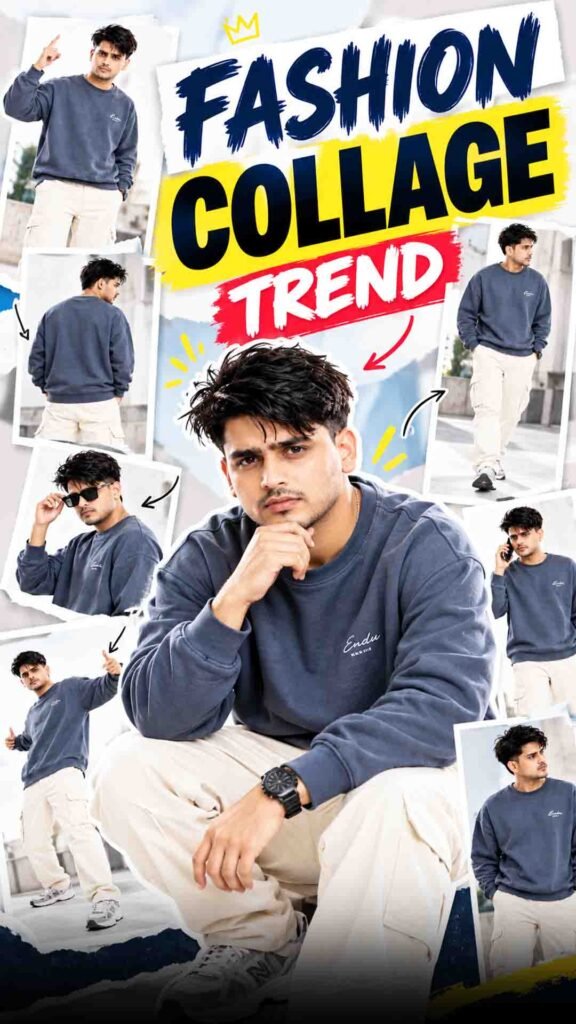
Do you want to turn your normal photo into a premium fashion lookbook? Now you can use ChatGPT to create an AI fashion collage showing you in 8 different poses.
This viral AI photo trend turns one reference photo into a creative fashion collage. It shows the same person in different poses while trying to keep the face, outfit, hairstyle, and overall appearance consistent.
You do not need to take 8 different photos or visit a professional photo studio. Just upload one clear reference photo and use a detailed AI prompt.
You can create a stylish fashion collage for Instagram posts, profile content, fashion inspiration, personal branding, and social media.
8 Pose Fashion Collage Prompt
Prompt
Using my uploaded photo, create an ultra-realistic, premium fashion photography collage featuring the exact same person in 8 different poses. Strictly preserve my real face, identity, hairstyle, skin tone, and natural facial features without any changes. OUTFIT: A stylish oversized slate-blue/charcoal-blue sweatshirt with subtle white lettering on the chest, cream-white cargo pants, and matching grey-and-white chunky sneakers. Add a simple black wristwatch. No cap or hat. Keep the outfit consistent across all 8 poses. POSES: 1. Standing confidently while pointing upward. 2. Full back view showing the outfit. 3. Side pose adjusting black sunglasses. 4. Walking naturally with a stylish stride. 5. Walking while talking on a smartphone. 6. Dynamic wide-leg pose with arms extended. 7. Relaxed crouching pose with elbows resting on the knees. 8. A stylish casual pose looking sideways. COMPOSITION: Arrange all 8 full-body and medium-body poses in a single seamless collage, similar to a professional fashion lookbook. Use a clean, bright white studio background with soft natural lighting, realistic shadows, accurate body proportions, and sharp clothing details. Keep every pose distinct and naturally spaced, with the entire collage clearly visible. STYLE: Photorealistic, high-resolution, premium streetwear editorial, realistic fabric texture, natural skin details, professional studio photography, clean minimalist aesthetic. IMPORTANT: The same person must appear in every pose. Preserve facial identity accurately. No extra people, no distorted hands, no duplicate poses, no unnecessary objects, no dark background, no borders, and no large text. Vertical 9:16 composition.
How to Create an 8 Pose Fashion Collage Using ChatGPT
Step 1: Upload Your Photo to ChatGPT
First, open ChatGPT and start a chat with image generation support.
Upload one clear, high-quality photo of yourself. Make sure your face is clearly visible.
If you want a full-body fashion collage, use a full-body reference photo. This can help the AI understand your outfit and body proportions.
For better results, avoid blurry photos, heavy filters, and extreme camera angles.
Step 2: Add the Fashion Collage Prompt
After uploading your photo, paste the prompt from the section above into the chat box.
The prompt should clearly explain that you want a premium fashion editorial collage with 8 different poses of the same person.
Also, ask ChatGPT to keep your face, hairstyle, skin tone, and outfit consistent across all 8 poses.
You can create different fashion styles, such as:
- Streetwear fashion
- Oversized sweatshirt and cargo pants
- Formal suit look
- Minimal casual outfit
- Luxury fashion editorial style
Choose a style that matches your personal taste.
Step 3: Select Your Outfit
Your outfit is an important part of the fashion collage.
If you want the same outfit in all 8 poses, describe every clothing detail in your prompt.
For example, you can choose:
- Oversized slate-blue sweatshirt
- Cream-white cargo pants
- Grey-and-white sneakers
- Black wristwatch
You can also choose your own outfit. Describe its colours, design, fit, fabric, and accessories.
Ask ChatGPT to keep the same outfit, colours, and accessories in every frame. This can help create a more consistent fashion lookbook.
Step 4: Choose 8 Different Fashion Poses
Now decide which poses you want in your collage.
Instead of asking for 8 random poses, describe each pose clearly. This can make your collage look more creative and professional.
Here are 8 pose ideas you can try:
- Confident Standing Pose: Stand straight and look directly at the camera.
- Side Profile Pose: Turn your body slightly to show your side profile.
- Walking Pose: Create a natural walking fashion shot.
- Hands-in-Pockets Pose: Stand casually with both hands inside your pockets.
- Relaxed Standing Pose: Keep your body relaxed and look natural.
- Seated Pose: Sit in a stylish and comfortable position.
- Over-the-Shoulder Pose: Turn slightly and look back towards the camera.
- Candid Fashion Pose: Create a natural pose that looks like a professional fashion shoot.
Try to keep every pose different so the final collage does not look repetitive.
Step 5: Choose a Premium Fashion Photography Style
To give your collage a professional look, describe the background and photography style.
You can try:
Clean Studio Look: Use a simple grey or beige studio background with soft lighting.
Luxury Editorial Look: Choose premium fashion photography with sharp clothing details and stylish poses.
Urban Streetwear Look: Use a modern city background with a fashionable street-style feel.
For a consistent collage, ask ChatGPT to maintain similar lighting, colours, and background across all 8 frames.
You can also request realistic skin texture, natural shadows, and sharp outfit details.
Step 6: Keep Your Face and Identity Consistent
If you want all 8 poses to look like you, clearly ask ChatGPT to follow your uploaded reference photo.
Mention that your original face shape, eyes, nose, lips, skin tone, and hairstyle should remain as close to the reference as possible.
Also, ask it to keep your body proportions and outfit consistent.
AI may still make small changes to facial features, clothing, or body details between frames. So, carefully check every pose in the final collage.
If one frame looks different, ask ChatGPT to correct that particular frame.
Step 7: Generate Your Final 8 Pose Fashion Collage
Once your photo and prompt are ready, submit your request to generate the image.
When the result is ready, check these important details:
- Are all 8 poses clearly visible?
- Does your face look consistent across the frames?
- Is the outfit the same in every pose?
- Are the poses different from each other?
- Does the collage have a balanced layout?
- Does the lighting look natural and professional?
If something is missing, ask ChatGPT to make specific corrections.
You can also try different versions and select the one you like most.
Your final fashion collage can be used for Instagram posts, fashion lookbooks, personal branding, and other social media content.
Tips for Better AI Fashion Collages
Follow these simple tips to improve your results:
- Upload a Clear Photo: Use a sharp reference image with a clearly visible face.
- Describe Your Outfit: Mention the exact colours, clothes, and accessories.
- Use Different Poses: Give each of the 8 frames a unique pose.
- Keep the Background Consistent: Use the same background style across the collage.
- Choose Good Lighting: Soft studio lighting can create a premium fashion look.
- Check Every Frame: Look for changes in your face, outfit, hands, and body proportions.
Frequently Asked Questions (FAQs)
1. Can I create an 8 pose fashion collage using ChatGPT?
Yes. You can upload a reference photo and ask ChatGPT to create a collage with 8 different fashion poses. Image generation availability may depend on your account and plan.
2. Do I need 8 different photos?
No. You can start with one clear reference photo. The AI will try to create different poses based on your instructions.
3. Can I keep the same outfit in all 8 poses?
Yes. Describe your outfit clearly and ask ChatGPT to keep its colours, design, and accessories the same in every frame. Small variations may still occur.
4. Can I create a fashion collage with my original face?
ChatGPT can use your uploaded photo as a reference and try to preserve your facial features. However, exact identity consistency across all 8 poses is not guaranteed.
5. Can I choose my own fashion style?
Yes. You can try streetwear, formal outfits, luxury fashion, casual looks, or any other style you want.
Final Words
Creating a professional fashion lookbook no longer requires a separate photoshoot for every pose.
With ChatGPT, you can use one reference photo to explore 8 different fashion poses in a single creative collage.
Just upload your photo, add the prompt from the section above, choose your favourite fashion style, and create your own AI fashion pose collage!