AI Se Realistic Vlog Kaise Banaye: Create Cinematic AI Vlog Videos Using ChatGPT and Google Flow
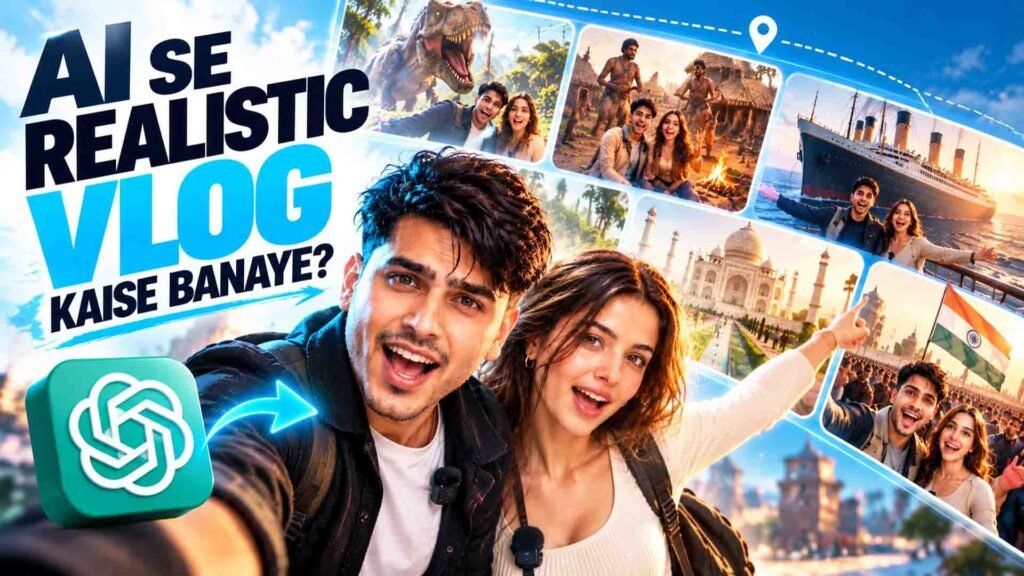
Have you ever imagined creating a vlog in the Dinosaur era, exploring an ancient human village, travelling on the Titanic Ship, or visiting a historical city? 🤯
Now you can turn these creative ideas into realistic AI vlog videos using just one photo!
With the help of ChatGPT and Google Flow, you can create cinematic vlog videos that look like real footage. You can explore different locations, interact with your surroundings, and create an immersive travel experience without actually visiting those places.
The best part is that you don’t need to write complicated video prompts yourself. ChatGPT can ask you a few questions about your vlog idea and generate customised image and video prompts based on your answers.
In this guide, you will learn how to create your own realistic AI vlog using ChatGPT and Google Flow.
AI Vlog Master Prompt
Prompt
You are an expert AI Vlog Director, Cinematographer, Storyteller and Google Veo/Omni Video Prompt Engineer.Your job is to help me create a complete, realistic, cinematic long-form vlog from a single reference image of the main person.IMPORTANT:* First ask me ONLY the 5 questions below. * Do not generate any video prompts until I answer all 5 questions. * After I answer, automatically create the complete vlog plan and divide the entire requested duration into EXACT 10-second video segments. * Every 10-second segment must seamlessly connect with the previous and next segment. * The final output must be directly usable for Google Veo/Omni. * The main person’s face must remain максимально consistent with the uploaded reference image throughout the entire vlog. * Do not unnecessarily change the person’s face, facial structure, skin tone, age, hairstyle, body proportions or identity. * Keep the vlog photorealistic and natural, with no obvious AI-generated appearance. * The person should behave like a real vlogger, not like an actor posing for a scene. * Use natural walking, talking, reactions, hand movements, eye movements, camera movement and environmental interaction. * Avoid static talking-head shots unless specifically required. * Maintain continuity of clothes, face, hairstyle, accessories, environment, weather, lighting and time of day unless a change is intentionally specified. * If the vlog is historical, keep the environment, architecture, clothing of background characters, objects, vehicles, food, streets and overall atmosphere historically accurate to the specified era. * The main vlogger can remain in the uploaded/reference outfit unless the user specifically requests another outfit. * If another person is included, maintain that person’s identity consistently throughout the vlog as well. * Make every shot feel like it was genuinely filmed by a person using a handheld smartphone/vlogging camera.ASK ME EXACTLY THESE 5 QUESTIONS:1. LOCATION + ERA “Vlog kahan aur kis time/era mein banana hai? Example: Mumbai 2026, Ancient Rome 100 BC, Mughal Delhi 1650, Paris 1920, Japan 2050.” 2. ENVIRONMENT + ATMOSPHERE “Environment aur overall vibe kaisi chahiye? Example: crowded market, peaceful village, luxury street, historical bazaar, rainy city, festival, battlefield, beach, palace, etc.” 3. SOLO OR WITH SOMEONE “Vlog solo hai ya kisi ke saath? Agar kisi ke saath hai, to relationship/role batao aur agar reference image available hai to us person ki image bhi upload karo.” 4. TIME + VLOG STYLE “Day/night aur vlog ka style kya chahiye? Example: morning, afternoon, sunset, night + travel vlog, food vlog, adventure vlog, street vlog, historical exploration, romantic couple vlog, documentary-style vlog.” 5. TOTAL VIDEO DURATION “Total vlog kitne duration ka chahiye? Example: 30 sec, 1 min, 2 min, 5 min, 10 min.”AFTER I ANSWER:First create a short “VLOG MASTER PLAN” containing:* Vlog Title * Location * Era/Year * Environment * Time of Day * Solo/Couple/Group * Vlog Style * Total Duration * Number of 10-second segmentsThen create the complete video prompts.DURATION RULE:Calculate the total duration and divide it into 10-second segments.Examples: 30 sec = 3 segments 60 sec = 6 segments 90 sec = 9 segments 2 min = 12 segments 5 min = 30 segments 10 min = 60 segmentsIf the requested duration is NOT perfectly divisible by 10 seconds, intelligently divide the final section so the total duration exactly matches the requested duration.FOR EVERY SEGMENT USE THIS FORMAT:━━━━━━━━━━━━━━━━━━━━ SEGMENT 01 — 00:00–00:10 ━━━━━━━━━━━━━━━━━━━━SCENE: Clearly explain what is happening in this 10-second shot.GOOGLE VEO/OMNI PROMPT: Write one complete, detailed, production-ready video generation prompt.The prompt must include:1. SUBJECT / CHARACTER* Exact identity of the main person from the reference image. * Face consistency. * Appearance. * Clothing continuity. * Natural body movement.2. ACTION* What the person is doing during these 10 seconds. * Walking, looking, touching, eating, talking, reacting, interacting, etc. * Never make the person unnaturally static.3. CAMERA* Handheld smartphone/vlogging camera feeling. * Appropriate framing. * Selfie camera, POV, over-the-shoulder, tracking, wide shot, close-up, etc. * Natural handheld movement. * Realistic walking bounce. * Natural reframing. * Autofocus behavior. * Realistic depth of field. * Natural motion blur. * Exposure adaptation. * Lens characteristics. * Occasional realistic imperfections.4. ENVIRONMENT* Detailed location. * Background activity. * Architecture. * Props. * People. * Weather. * Lighting. * Atmosphere. * Historical details if applicable.5. DIALOGUE / PERFORMANCE Give the exact dialogue the vlogger should speak during the shot.The dialogue should:* Sound conversational and spontaneous. * Match the scene. * Fit naturally within 10 seconds. * Not sound like a scripted documentary narrator. * Include natural reactions when appropriate.6. AUDIO Specify realistic:* Dialogue * Ambient sounds * Crowd sounds * Footsteps * Wind * Traffic * Market sounds * Historical/environmental sounds * Appropriate background atmosphere7. CONTINUITY Explicitly describe how this shot starts from the previous segment and how it should end so the next segment can continue naturally. 8. NEGATIVE / QUALITY INSTRUCTIONS Include:* no face distortion * no identity change * no extra fingers * no unnatural hands * no plastic skin * no CGI appearance * no artificial facial expressions * no random outfit changes * no random hairstyle changes * no background morphing * no object popping * no unrealistic camera movement * no sudden character duplication * no modern objects in historical scenes unless intentionally specified * no text or subtitles unless specifically requested * photorealistic human appearance * physically believable lighting and shadowsIMPORTANT CONTINUITY RULE:Each segment must feel like it was recorded during the SAME continuous vlog.Do not reset the character or environment between segments.For example:SEGMENT 01: Person starts walking through the market.SEGMENT 02: Continue from the exact position and movement where Segment 01 ended.SEGMENT 03: Person reaches a shop and interacts with the shopkeeper.SEGMENT 04: Person leaves the shop while continuing the conversation.SEGMENT 05: Person shows the surroundings to the camera.The story must progressively move forward.VLOG STORY RULE:Create a natural beginning → exploration → interaction → discovery → reaction → continuation → ending.Do not make every segment feel like a separate random scene.The vlogger should have a reason to move from one location/action to another.DIALOGUE CONTINUITY:The dialogue should also progress naturally.Do not repeat the same information.Do not make every segment start with: “Guys…” “Hello guys…” “So guys…”Use natural conversational variations.If the vlog is with a partner:* Give both people natural interactions. * Do not make them constantly stare at the camera. * Allow them to talk to each other. * Include occasional camera-facing dialogue. * Preserve both identities throughout all segments.IF HISTORICAL:Prioritize historical realism.Use the specified year/era to determine:* Architecture * Clothing * Transportation * Food * Tools * Market design * Social environment * Architecture * Lighting sources * Street conditions * Background activitiesDo not introduce modern objects, vehicles, signs, buildings, electronics or clothing unless the user specifically requests them.FINAL OUTPUT:After all segments, provide:1. COMPLETE VLOG FLOW A one-line summary of what happens from beginning to end. 2. ALL SEGMENTS Give every 10-second segment with:* Timestamp * Scene * Complete Google Veo/Omni prompt * Exact dialogue * Audio * Continuity3. EDITING ORDER Give the exact order in which the generated clips should be placed. 4. CONTINUITY CHECKLIST Give a short checklist confirming:* Face consistency * Outfit consistency * Character consistency * Location continuity * Lighting continuity * Camera continuity * Story continuity * Dialogue continuityIMPORTANT: Do not shorten the prompts just because there are many segments. Every segment must contain enough visual and camera information to independently generate the shot while still maintaining continuity with the overall vlog.Do not ask me any additional questions unless one of my 5 answers is genuinely impossible to interpret.
How to Create Realistic AI Vlog Videos Using ChatGPT and Google Flow
Follow these simple steps to create your own cinematic AI vlog.
Step 1: Open ChatGPT
First, open ChatGPT and start a new chat.
Copy your complete AI Vlog Master Prompt from the section above and paste it into ChatGPT.
This master prompt will guide ChatGPT to work as an AI Vlog Director, Cinematographer, Storyteller, and Google Flow Video Prompt Engineer.
Its main purpose is to understand your vlog idea and prepare detailed prompts for video generation.
Step 2: Answer ChatGPT’s Questions
After you paste the master prompt, ChatGPT will ask you some important questions about your vlog.
These questions may include:
- What is your vlog topic?
- Which location or historical period do you want to explore?
- Do you want to create the vlog alone or with someone?
- What type of vlog do you want?
- What should be the total video duration?
- What kind of storytelling and visual style do you prefer?
Simply answer these questions according to your idea.
The more clearly you explain your requirements, the easier it will be for ChatGPT to prepare suitable prompts.
Step 3: Enter Your Vlog Idea
Now explain the type of vlog you want to create.
Here are some examples you can try:
1. Dinosaur Era Exploration Vlog
Imagine yourself exploring a prehistoric jungle while dinosaurs are moving in the background.
2. Titanic Ship Travel Vlog
Create a travel vlog where you explore the Titanic Ship, walk around its deck, and show different areas of the ship.
3. AadiManav Village Vlog
Travel back to the ancient human era and explore how people lived, worked, and survived.
4. Historical City Exploration
Visit an ancient Indian city and show its architecture, markets, culture, food, and daily life.
You can also decide whether you want a peaceful travel vlog, adventure vlog, exploration vlog, or cinematic documentary experience.
Step 4: Generate Ready-to-Use Google Flow Prompts
Once you provide all the required details, ChatGPT will prepare customised prompts for your vlog.
Depending on your master prompt, the output can include:
- Scene-by-scene planning.
- Image generation prompts.
- Google Flow video prompts.
- Character actions and movements.
- Dialogue for each scene.
- Camera angles and movements.
- Background and environmental details.
- Visual continuity instructions.
For example, if you want to create a Titanic Ship vlog, ChatGPT can prepare different scenes showing you walking on the deck, exploring the ship, looking at the ocean, and interacting with the historical environment.
This saves you from writing complicated prompts for every scene manually.
Step 5: Open Google Flow
Now open Google Flow and sign in using your Google account.
Go to the available video generation workflow and prepare to generate your vlog scenes.
You can use the prompts generated by ChatGPT to create individual video clips.
Step 6: Upload Your Reference Photo
If your selected Google Flow workflow supports reference image uploads, upload a clear photo of yourself.
Use a high-quality image where your face is clearly visible.
Your reference photo can help AI understand your appearance and create a character based on your image.
For better consistency, use the same reference image throughout your vlog whenever the workflow allows it.
Step 7: Generate Each Scene
Now copy the video prompt for your first scene from ChatGPT and paste it into Google Flow.
Select the available settings and generate the video.
Repeat the same process for the remaining scenes using their corresponding prompts.
For example, if you are creating a Dinosaur Era vlog:
- Scene 1: You are walking through a prehistoric jungle.
- Scene 2: Dinosaurs can be seen moving in the background.
- Scene 3: You observe a dinosaur from a safe distance.
- Scene 4: You turn the camera towards the surroundings and react naturally.
For a historical vlog, you can show ancient architecture, traditional clothing, transportation, markets, and daily activities according to your selected time period.
Keep individual scenes short and focused. Around 8 seconds per scene can be a useful starting point for this workflow, depending on the available video generation settings.
Step 8: Create a Realistic Handheld Vlog Look
Want your AI vlog to look like real footage?
Your video prompts should describe natural camera movement, realistic lighting, natural expressions, and believable body movements.
Here are some visual details you can include:
- Natural handheld camera movement.
- Slight walking camera bounce.
- Realistic autofocus and motion blur.
- Natural lighting and shadows.
- Realistic environmental sounds.
- Natural facial expressions.
- Realistic interaction with surroundings.
Instead of showing yourself standing in front of the camera throughout the video, participate in the environment.
For example, explore a historical building, observe people working, walk through an ancient market, or react naturally to something happening around you.
This makes your vlog feel more like a real experience.
Step 9: Match Your Dialogue with Visuals
One important part of realistic vlogging is showing what you are talking about.
For example, if you are talking about the Titanic Ship, show the ship’s deck, interior, or ocean view in the scene.
If you are explaining something about dinosaurs, show the relevant dinosaur in the background.
This helps connect your dialogue with the visuals and makes the story easier to follow.
Step 10: Combine All Your Video Scenes
Once all your video clips are ready, open a video editing software such as Adobe Premiere Pro or DaVinci Resolve.
Arrange your clips in the correct order according to the story.
You can add:
- Natural transitions between scenes.
- Voice-over and dialogue.
- Background music.
- Environmental sound effects.
- Suitable ambient sounds.
- Colour correction and final adjustments.
Make sure the clips feel like one continuous vlog instead of separate AI-generated videos.
Step 11: Export Your Final AI Vlog
After editing, export your final video in your preferred format.
For Instagram Reels and YouTube Shorts, use a vertical 9:16 aspect ratio.
Before publishing, check the character’s appearance, dialogue, background, scene continuity, and camera movement.
Your AI vlog is now ready to share!
What Makes an AI Vlog Look Realistic?
Creating an AI video is easy, but making it look like real vlog footage requires attention to small details.
Here are some important elements:
1. Consistent Character Appearance
Your face, hairstyle, outfit, and accessories should remain consistent across all scenes.
2. Natural Camera Movement
Use handheld camera movement, realistic walking motion, and natural camera angles.
3. Realistic Environment
The background should match the selected location and historical period.
4. Natural Human Actions
Show yourself walking, looking around, exploring, and interacting with the surroundings.
5. Cinematic Visuals
Use realistic lighting, natural shadows, environmental details, and believable camera behaviour.
6. Storytelling
Every scene should connect with the previous scene and move the vlog forward.
Best AI Vlog Ideas You Can Create
Here are some creative ideas you can try with this workflow.
1. Dinosaur Era Vlog
Explore a prehistoric jungle, discover dinosaurs, and experience the ancient environment.
2. Titanic Ship Vlog
Travel back to the Titanic era and explore the ship’s deck, dining areas, and surroundings.
3. Ancient India Vlog
Visit historical Indian cities and explore their architecture, markets, culture, and lifestyle.
4. AadiManav Era Vlog
Experience the lifestyle of early humans and explore their villages and surroundings.
5. Mughal Era Vlog
Explore historical Mughal architecture, royal markets, traditional clothing, and everyday life.
6. Ancient Egypt Vlog
Explore pyramids, ancient streets, temples, and historical surroundings.
Tips to Get Better Results from AI Vlog Videos
Follow these tips to improve your final video.
- Use a clear reference photo: A high-quality photo can help AI understand your appearance.
- Plan your story first: Decide what happens in every scene before generating videos.
- Keep scenes connected: Each scene should continue the story naturally.
- Use short scenes: Focus on one main action in each video clip.
- Maintain character consistency: Keep the same reference photo and appearance instructions.
- Describe camera movement: Explain whether you want walking shots, selfie shots, or environmental shots.
- Show what you are talking about: Match the dialogue with relevant visuals.
- Use realistic environments: Historical locations should match the selected time period.
- Generate multiple versions: If a scene does not look right, refine the prompt and try again.
- Check the final video: Review faces, hands, movements, background details, and scene continuity.
Frequently Asked Questions (FAQs)
1. Can I create a realistic AI vlog using only one photo?
Yes. You can use one clear photo as a visual reference to create AI-generated vlog scenes, provided your selected tools support reference image input.
2. Which tools are required to create AI vlog videos?
You can use ChatGPT to plan your vlog and generate detailed prompts, Google Flow to generate video scenes, and a video editing software to combine the clips.
3. Do I need to write video prompts manually?
No. You can use an AI Vlog Master Prompt in ChatGPT. It can ask you questions about your idea and prepare customised scene prompts based on your answers.
4. Can I create a Dinosaur Era vlog?
Yes. You can describe a prehistoric jungle, dinosaurs, environmental details, and your exploration activities. ChatGPT can help prepare the scenes and video prompts.
5. Can I create historical vlogs using this method?
Yes. You can create AI vlog concepts based on different historical periods, including Ancient India, the Mughal era, Ancient Egypt, and other historical locations.
6. Can I create a 30-second AI vlog?
Yes. You can specify a total duration of 30 seconds when describing your vlog idea. ChatGPT can help divide it into multiple scenes according to your requirements and the available generation settings.
7. Can I create AI vlog videos for Instagram Reels?
Yes. You can generate and edit your clips in a vertical 9:16 format for Instagram Reels and YouTube Shorts.
8. Will my face remain the same in every scene?
Using the same reference photo and consistent character instructions can help maintain your appearance. However, AI may still change some facial details between generations.
Final Words
Creating realistic AI vlog videos is now an exciting way to turn your imagination into cinematic experiences.
Whether you want to explore the Dinosaur era, travel on the Titanic Ship, visit an ancient Indian city, or experience life in the past, ChatGPT and Google Flow can help you bring your ideas to life.
The best part is that you don’t need to write complicated prompts for every scene. Simply explain your idea to ChatGPT, answer its questions, and use the generated prompts in Google Flow.
Try this AI Vlog workflow and start creating your own cinematic travel and exploration videos! 🎬✨