Create This Viral AI Cricket Trend Using Google Flow
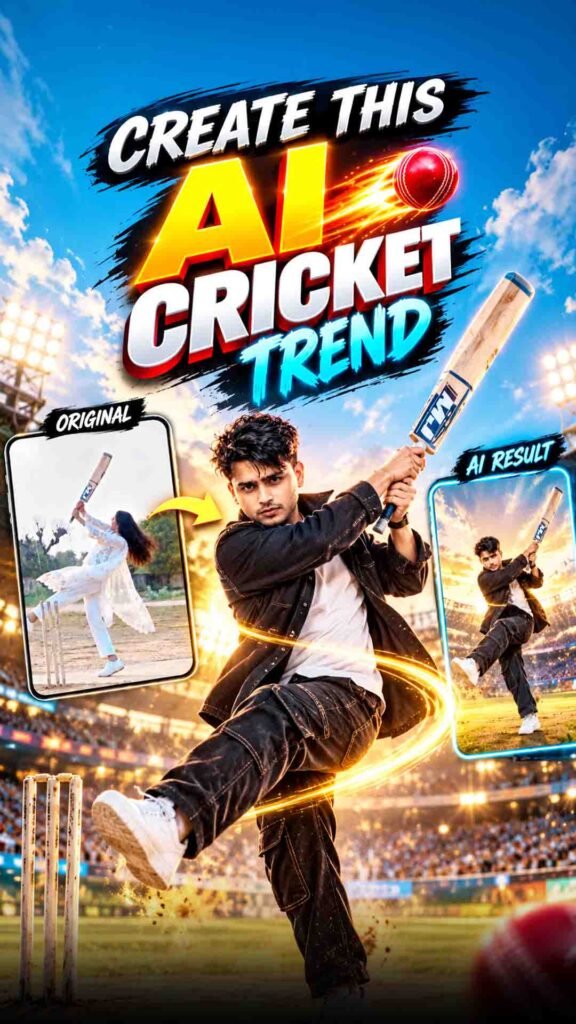
Have you seen people turning their photos into amazing cricket videos with AI? The AI Cricket Trend is going viral on Instagram Reels. These videos look like real cricket shots from a movie. But the best part is that you can create your own video without recording yourself playing cricket.
You only need a photo of yourself, a cricket reference video, and Google Flow. With the right prompt, you can turn your photo into a cinematic cricket video.
And yes, both boys and girls can try this AI cricket trend! You do not need a cricket bat, a cricket ground, or a camera. You can create your own video with the help of AI.
In this guide, you will learn how to create the AI cricket video, how to use your photo, why the reference video is helpful, and how to get better results from Google Flow.
AI Cricket Trend Prompt (Copy and Paste)
Prompt
@video1 is the master reference. Recreate it exactly, frame by frame: the same camera position, camera angle, framing, camera distance, lens look, slow motion timing and the same continuous shot. Copy every movement exactly as in @video1: the active batting stance, the bat waggles, the tap of the bat on the pitch, the backlift, the ball arriving at waist/chest height, the pull shot and the bat swing path, the ball flying up into the sky, the slow-motion one-leg finishing pose, turning to the camera, hiding the face behind the bat, the smile and walking away. Same timing as @video1. LOCATION: Keep the location exactly as in @video1 — the same dusty village cricket ground, the same cement pitch, the same three wooden stumps in the same place next to the batter, the same sky-blue building, the same trees and the same hazy evening sky. Do not change or add anything to the location. IDENTITY @image1 is the ONLY identity reference. Replace the person in @video1 with the person in @image1 — same face, gender, age, skin tone, body shape and hairstyle as @image1. Do not copy the original person’s face from @video1. Clothes and shoes come from @image1 (same colours and style), identical in every frame. If the legs or shoes are not visible in @image1, use plain trousers matching the top and white sneakers. Only one person in the video. BAT AND BALL: Same bat and ball movement as @video1. Plain wooden bat with no stickers, no brand name, no text. REALISM: Photorealistic real phone video, natural skin, natural motion, same lighting as @video1. AUDIO: Preserve the original background music and its timing from @video1 if supported. Do not add dialogue, voice-over or unrelated sound effects. No lip-sync, no speaking. STRICT RULES – Do not invent new scenes, do not cut to close-ups, do not change the camera angle. – No extra people. No text, captions, logos or watermarks. – Keep 9:16 vertical. FINAL RESULT: The exact same video as @video1, with only the person replaced by the person from @image1.
Copy the prompt above and paste it into Google Flow.
Upload your photo and the cricket reference video as required by the prompt. If the prompt uses reference labels such as @image1 and @video1, make sure each label points to the correct file.
The prompt tells the AI what kind of cricket scene you want. It can include details about your appearance, the cricket action, camera movement, and the overall look of the video.
Note: Add your final tested prompt here before publishing this article.
Why Is the AI Cricket Trend So Popular?
Cricket is one of the most loved sports in India. People enjoy watching cricket matches, sharing cricket videos, and making fun cricket reels.
Now, AI has made it possible to create cricket-style videos using personal photos. This makes the trend fun because people can imagine themselves playing a shot in a cinematic cricket scene.
Another reason for its popularity is that both boys and girls can try it. Everyone can use their own photo and create a personal version of the trend.
These videos can also look great in slow motion, especially when the player hits the ball or finishes the shot with a stylish pose.
You can try different photos and prompts to create your own version. You can also edit the final video, add music, and share it with your friends.
Watch the Viral AI Cricket Video
Before creating your own video, watch the reference video above.
Look at the player’s movement, the camera angle, the cricket shot, and the final pose. These details can help you understand the type of video you want to create.
You can download the reference video and use it in Google Flow if your chosen workflow supports video references.
Important: Use a video that you have permission to download and use. If you plan to publish your result, make sure you follow the rules for the original video and any music used in it.
What Do You Need to Create This AI Cricket Video?
Before you start, keep these things ready.
A Clear Photo of Yourself
First, choose a good photo of yourself.
Your face should be clearly visible in the photo. Try to use an image with good lighting and no objects covering your face.
A clear photo can help the AI understand your appearance. If your face is hidden, too small, or blurry, the final video may not look like you.
You can use a photo of yourself in casual clothes. Follow the instructions in your prompt about the clothes and appearance you want in the final video.
A Cricket Reference Video
The second thing you need is the cricket video you want to recreate.
This video can help Google Flow understand the type of cricket action and camera movement you want. For example, it may show a player holding a bat, hitting the ball, or finishing a shot.
A clear reference video is helpful because it gives the AI more information about the scene you want to create.
However, Google Flow may not copy every movement exactly. The final result can be different from the original video.
Google Flow
You also need access to Google Flow.
Open Google Flow and check which video creation options are available in your account. You may need to sign in to your Google account before using it.
Some features may depend on your plan, account, or current tool settings. Check the available options before starting your project.
Why Should You Use a Reference Video?
You may wonder why you need to upload a cricket video when you can simply write a prompt.
The reason is simple. A prompt tells the AI what you want, but a reference video can show it how the scene looks.
For example, you can write that you want a cinematic cricket shot. But the AI may choose a different camera angle, player movement, or ending pose.
When you add a suitable reference video, the AI gets more visual information about the scene you want to create.
It may help guide details such as:
- The player’s starting position.
- The movement of the bat.
- The camera angle.
- The player’s body movement.
- The timing of the cricket action.
- The final pose.
The result will still depend on how Google Flow reads your references and prompt. It may not reproduce every detail of the original video.
For better results, choose a clear reference video and a photo in which your face is easy to see.
How to Create the AI Cricket Trend Video in Google Flow
Now, let’s create your own AI cricket video. Follow these easy steps.
Step 1: Download the Cricket Reference Video
First, find the cricket video you want to recreate.
Save the video to your phone or computer. Keep it in a folder where you can find it easily.
Watch the video before uploading it. Make sure it shows the cricket action you want in your final result.
If the video has music or speech, check whether your workflow supports it. If you face an audio error, try a version without sound, provided you have the right to edit and use that video.
Step 2: Choose a Good Photo
Now, select a clear photo of yourself.
Try to choose a photo where your face is fully visible. Avoid images with strong filters, poor lighting, or heavy blur.
A front-facing photo can be useful when you want the AI to understand your facial features. However, you should follow the needs of your chosen prompt.
You can use your own photo whether you are a boy or a girl.
Step 3: Open Google Flow
Open Google Flow in your browser and sign in if needed.
Create a new project and look for a video creation option that supports the reference files you want to use.
The names of the options and available settings may change over time. Use the options shown in your account.
Step 4: Upload Your Reference Video
Upload the cricket video you saved earlier.
If Google Flow lets you select a video reference in your chosen workflow, add the file there.
This reference will help guide the cricket action and camera style. Make sure you select the correct file before moving to the next step.
Step 5: Upload Your Photo
Next, upload your photo.
If the workflow allows you to add both an image and a video reference, select your photo as the image reference.
Check that both files have uploaded correctly. If the photo is missing or the wrong video is selected, the final result may not match what you want.
Step 6: Add the AI Cricket Prompt
Now, copy the AI cricket prompt from the section above.
Paste it into the prompt box. If Google Flow uses reference labels such as @image1 and @video1, select the correct uploaded files as required by the interface.
The prompt should explain the cricket action, camera movement, visual style, and how closely the result should follow the reference.
Check the prompt before generating the video.
Step 7: Check the Video Settings
Before generating the video, check the settings available in your project.
If you want to post the result as an Instagram Reel, a vertical video with a 9:16 ratio is usually a good choice.
Select the video length and quality supported by your account. The available options may differ, so use the settings shown on your screen.
Step 8: Click Generate
Once everything is ready, click the Generate button.
Google Flow will process your prompt and reference files. Wait for the video to finish generating.
The first result may not be perfect. Sometimes the face, bat movement, or camera angle may look different from the reference.
If this happens, check your photo, reference video, and prompt. You can make small changes and try again.
Step 9: Watch and Save Your Video
When the video is ready, watch it from beginning to end.
Check whether your face looks right and whether the cricket action looks natural. Also check for any strange movements or visual errors.
If you like the result, export or download it using the available options.
You can then edit the video in your favourite video editor and prepare it for Instagram Reels or YouTube Shorts.
Tips to Get Better Results
Want your AI cricket video to look better? Keep these simple tips in mind.
Use a Clear Photo
Your photo is one of the most important parts of this process.
Choose an image where your face is easy to see. A blurry or dark photo may make it harder for the AI to keep your appearance consistent.
Choose the Right Reference Video
Use a cricket video that clearly shows the action you want.
If you want a stylish batting shot, choose a reference that shows the player’s position and bat movement clearly.
Follow the Prompt Carefully
Read the prompt before using it.
If it asks you to upload a photo and a video, make sure both are added correctly. If it uses special reference labels, select the right files.
Try Again If the Result Is Not Good
AI videos can look different each time you generate them.
If the first result does not look right, check your photo, reference video, and prompt. Make small changes and generate another version.
Check the Final Video
Always watch the full video before sharing it.
Look for face changes, strange hand movements, or cricket equipment that looks unusual. Choose the version that looks best to you.
Use the Right Video Size
If you want to post your video as an Instagram Reel or YouTube Short, a vertical format is a good choice.
A vertical video fills more of the phone screen and makes it easier for people to watch your content.
Check the video before posting to make sure the important action is visible and nothing important is cut off.
Can Boys and Girls Create This AI Cricket Trend?
Yes! Both boys and girls can try this trend.
You only need a suitable photo and a cricket reference video. You can use your own photo and follow the prompt to create a cricket-style video.
The final result may look different for each person because AI uses the uploaded references and instructions to generate the scene.
You can also try different photos to see which one gives you the best result.
Can You Make This AI Cricket Video on Your Phone?
You may be able to create this video on your phone if Google Flow and the required upload options are available in your account.
Keep your photo and reference video saved on your phone. Then open Google Flow in a supported browser and follow the same process.
If you find it difficult to upload files on your phone, you can try using a computer.
The steps may look a little different depending on your device and the version of Google Flow you are using.
Common Problems and How to Fix Them
Sometimes, your AI cricket video may not look the way you expected. Here are a few common problems and simple ways to fix them.
The Face Looks Different
If your face changes in the video, try uploading a clearer photo.
Choose an image with good lighting and a clear view of your face. You can also make the prompt more specific about keeping your facial features close to the uploaded photo.
The Cricket Shot Looks Wrong
If the player does not perform the right cricket shot, check your reference video.
Choose a video that clearly shows the action you want. Make sure your prompt also describes the movement in simple and clear words.
The Camera Angle Changes
Sometimes, the AI may use a different camera angle from the reference.
Try using a reference video with a clear view of the player. You can also mention the camera position and movement in your prompt.
The Video Does Not Generate
If Google Flow cannot generate your video, check whether your files have uploaded correctly.
Make sure your video and photo use supported formats. You can also check the options available in your account and try again.
If the problem continues, try a different reference file or a shorter prompt.
Frequently Asked Questions (FAQs)
What Is the AI Cricket Trend?
The AI Cricket Trend is a social media trend where people use AI tools to create cricket-style videos from photos and reference videos.
Which Tool Can I Use to Create This Video?
You can try Google Flow if your account supports the required video and image reference features.
Can Girls Also Make This Video?
Yes! Girls can also use their photos to try the AI cricket trend.
Do I Need to Record Myself Playing Cricket?
No. You can use a photo and a reference video to create an AI cricket-style video without recording yourself playing cricket.
Why Does My AI Video Look Different from the Reference?
The result depends on your photo, prompt, reference video, and the AI tool. Google Flow may change some movements, camera angles, or other details.
What Should I Do If My Face Does Not Look Right?
Try using a clearer photo where your face is fully visible. Also, check whether your prompt asks the AI to keep your facial features as close to the photo as possible.
Can I Post My AI Cricket Video on Instagram?
Yes, you can share your video on Instagram if it follows the platform’s rules and you have the necessary rights to use the content in it.
Is the AI Cricket Trend Free?
The cost depends on the tools and account options available to you. Check Google Flow for the current plan, limits, and video generation options before starting.
Final Words
The AI Cricket Trend is a fun way to create a cricket video using your own photo. You do not need to record yourself playing cricket or learn difficult video editing skills.
Just choose a clear photo, download a suitable reference video, open Google Flow, and follow the steps in this guide.
Remember that AI results can change, so your first video may not look perfect. Try different prompts and photos until you get a result you like.
Want the prompt for this viral cricket trend? Follow me and comment “VIRAL” on my Instagram Reel. I’ll send you the prompt in your DM.
Try it yourself and create your own AI cricket reel! 🏏🔥