Gangnam Style AI Dance Trend: Create a Viral Dance Video Using Your Photo
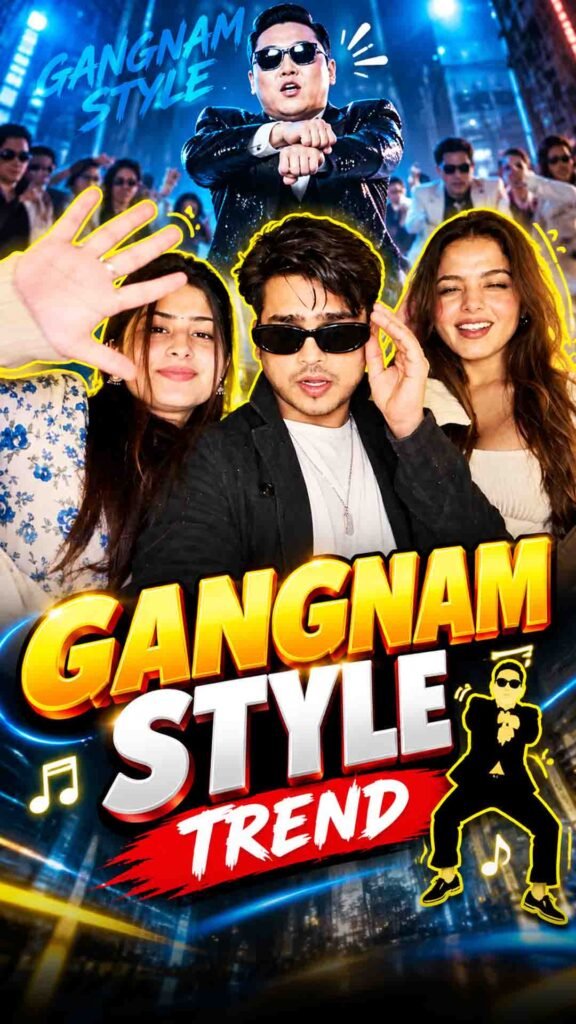
Remember the famous Gangnam Style dance by PSY? This iconic dance is getting a fun AI twist!
Now you can use your own photo to create an entertaining Gangnam Style-inspired dance video with AI video generation tools like Google Flow.
In this trend, you upload your photo and ask AI to create energetic dance movements, funny expressions, and dynamic camera shots. The goal is to make it look like you are performing the famous horse-riding-inspired dance.
You do not need to record yourself dancing. You can use an AI-generated video for Instagram Reels, YouTube Shorts, and other social media content.
Let’s see how you can create your own AI dance video using Google Flow.
Gangnam Style AI Dance Video Prompt
Prompt
Swap the characters in the original video with the reference persons from the provided images. Replace Character 1 with the person from Image 1, Character 2 with the person from Image 2, and Character 3 with the person from Image 3. Each character’s face, body, skin tone, facial features, hair, and overall physical appearance must be an exact 1:1 match to their respective reference images – do not alter, modify, or reinterpret any physical trait. The identity of each person must be preserved with complete accuracy as shown in the reference images. Replace the outfits of each character entirely with the clothing shown in their respective reference images. Preserve every detail of the outfit including fabric texture, color, cut, styling, accessories, and garment fit exactly as seen in the reference images. The original video’s costumes must be completely replaced. Preserve all facial expressions, body movements, gestures, poses, camera angles, lighting, and background exactly as they appear in the original video. Only the faces, physical identity, and outfits of the characters should change. Everything else motion, timing, scene composition, and environment – must remain 100% identical to the source video. Remove all text, watermarks, logos, subtitles, and overlays present in the original video. The final output must be completely clean with no text or graphics visible anywhere in the frame.
How to Create a Gangnam Style AI Dance Video Using Google Flow
Step 1: Open Google Flow
First, open Google Flow and sign in with your Google account.
Go to the video generation section and check the available options. Select an image-to-video or reference-image workflow if your chosen model supports it.
Google Flow features and usage limits may vary depending on your account and selected model.
Step 2: Upload Your Photo
Now upload a clear, high-quality photo of yourself.
For better results, choose a photo where your face and body are clearly visible.
A full-body photo can be helpful because this dance includes many arm, leg, and body movements.
If you only upload a close-up face photo, the AI may need to create the remaining body details.
Step 3: Add the Gangnam Style Dance Prompt
After uploading your photo, paste the prompt from the section above into the prompt box.
The prompt should describe the type of dance video you want to create.
You can include details such as:
- Energetic and playful dance movements
- Iconic horse-riding-inspired dance steps
- Funny and confident expressions
- Natural arm and leg movements
- Smooth body coordination
- Dynamic camera movements
You can also ask the AI to keep your face, hairstyle, and overall appearance close to the uploaded reference photo.
If your selected workflow supports video references, you can also provide a dance reference clip to help describe the movement. However, an exact reproduction of the choreography is not guaranteed.
Step 4: Generate Your AI Dance Video
Once your reference photo and prompt are ready, select the available video settings and click the Generate button.
Google Flow will try to create a dance video based on your instructions.
After generation, check the video carefully:
- Does the person look like your reference photo?
- Are the dance movements smooth?
- Do the arms and legs look natural?
- Are there any unwanted body distortions?
- Does the video have the energetic feel you wanted?
If the dance looks unnatural, try changing the prompt. You can also experiment with shorter dance sequences and simpler camera movements.
Step 5: Edit Your Video and Add Music
Once you get a result you like, use the available export or download option.
You can then open the video in CapCut or another video editor.
Make your video more entertaining by:
- Trimming unwanted frames
- Adding suitable music
- Adjusting the video timing
- Adding simple transitions
- Exporting in a vertical format for Reels and Shorts
If you want to use the original Gangnam Style song, choose licensed audio available through the platform’s music library or another authorised source.
Your AI dance video is now ready to share!
Tips for Better AI Dance Videos
Follow these simple tips to improve your results:
- Use a Clear Photo: Choose a sharp image where your face is easy to see.
- Prefer Full-Body Photos: This gives the AI more visual information for creating dance movements.
- Describe the Dance Clearly: Mention the movement style and body actions you want.
- Keep Camera Movement Simple: Too many camera movements can make the video look confusing.
- Check Body Movements: Look carefully for unnatural arms, legs, and hand movements.
- Try Different Versions: Generate a few variations and select your favourite result.
Frequently Asked Questions (FAQs)
1. Can I create a Gangnam Style dance video using my photo?
Yes. You can upload your photo to an AI video generation tool and ask it to create a Gangnam Style-inspired dance video.
2. Can I use Google Flow for AI dance videos?
Yes, if your account and selected model support the required image-to-video workflow. Available features and usage limits may vary.
3. Do I need a full-body photo?
A full-body photo is helpful because it gives the AI more information about your body and clothing. However, the result will depend on the reference image and selected model.
4. Can AI copy the original Gangnam Style dance perfectly?
AI can try to create similar horse-riding-inspired dance movements, but exact choreography and timing are not guaranteed.
5. Can I upload my AI dance video to Instagram Reels?
Yes. You can edit your generated video and prepare it for Instagram Reels or YouTube Shorts. Make sure you have the necessary rights to any music you use.
Final Words
The Gangnam Style AI dance trend is a fun way to turn your normal photo into an entertaining dance video.
With Google Flow, you can experiment with energetic dance movements, funny expressions, and creative camera shots without recording the dance yourself.
Just upload your photo, add the prompt from the section above, and create your own AI dance video. Have fun trying different versions and sharing your favourite result!