Gemini Se Hairstyle Kaise Banaye? | AI Hairstyle Try On (Male & Female)
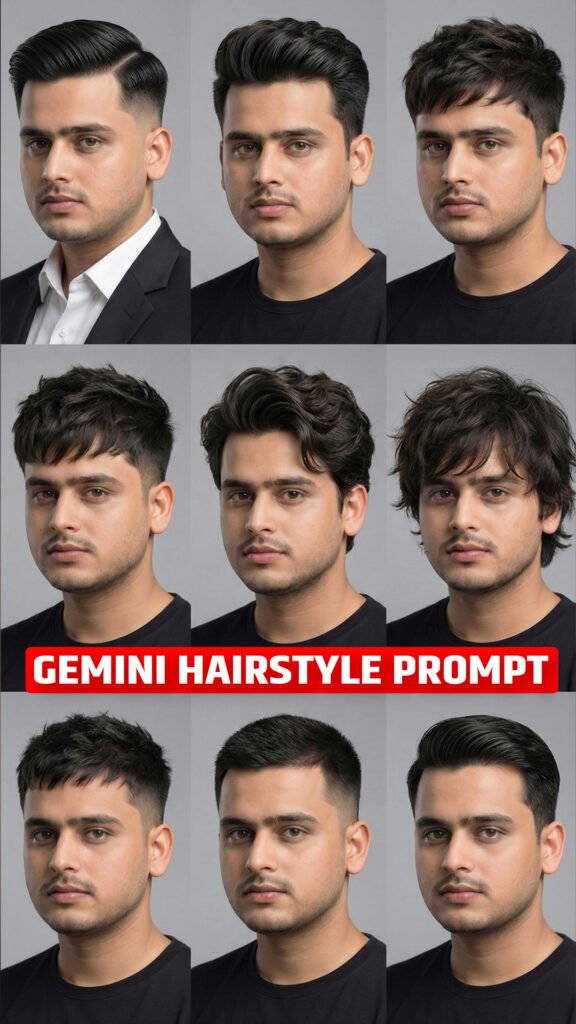
Do you want to try a new hairstyle but are worried about how it will look on your face? Now, you can use Google Gemini AI to try different hairstyles on your own photo before getting an actual haircut.
With the help of a simple AI prompt, you can see how different hairstyles may look on you. You can try short hair, long hair, curly hair, straight hair, fades, bobs, and many other styles.
The best part is that this method works for both males and females. You only need a clear photo of yourself and a hairstyle prompt.
In this guide, you will learn how to use Gemini AI for a hairstyle try-on, how to change the hairstyle name in the prompt, and how to compare different looks.
Gemini AI Hairstyle Try-On Prompt
Copy the prompt below and paste it into Google Gemini after uploading your photo.
Copy and Paste This Prompt:
For boys – use this prompt
CRITICAL REQUIREMENT: Maintain 100% exact likeness of my face from the input photo in all generated images. Only the hair should change. Perform a precise analysis of my face shape, hair texture, and density from the upload. Recommend trending hairstyles for three scenarios: Professional, University, and School. Then, visualize these recommendations by generating a realistic 3×3 hairstyle grid (9:16, 4K). Ensure all styles are wearable, modern trends that match my hair type, applied photorealistically to my unchanging face.
For girls – use this prompt
CRITICAL REQUIREMENT: Maintain 100% exact likeness of my face and the entire visual context from the input photo in all generated images. The specific red dress, the hand pose near the face, the smile, the lighting, and the background with plants must REMAIN IDENTICAL to the source image. Only the hair region should be modified. Perform a precise analysis of my face shape, hair texture, and density from the upload. Based on this analysis, recommend trending hairstyles appropriate for my gender for three scenarios: Professional, University, and School. Then, visualize these recommendations by generating a realistic 3×3 hairstyle grid (9:16, 4K). Ensure all styles are wearable, modern trends (spanning varied lengths and styles suitable for my hair type), applied photorealistically onto the existing head and pose in the original photo, replacing the current hair seamlessly.
How to use the prompt: Replace [INSERT HAIRSTYLE NAME HERE] with the hairstyle you want to try. For example, you can write Textured French Crop, Low Fade, Long Curly Hair, or Shoulder-Length Bob.
What Is Gemini AI Hairstyle Try-On?
Gemini AI Hairstyle Try-On is a way to preview different hairstyles using artificial intelligence.
Normally, if you want to try a new hairstyle, you have to visit a salon and get your hair cut. But what if you could see a preview before making that decision?
With an AI hairstyle prompt, you can upload your photo and ask Gemini to show you a different hairstyle.
For example, if you have short hair and want to see how you might look with long hair, you can enter the name of a long hairstyle in the prompt.
The AI will attempt to edit your photo to show the requested look while keeping your facial features similar to the original image.
Important: AI-generated previews are only visual estimates. They cannot guarantee exactly how a hairstyle will look in real life because your natural hair texture, hair density, and hairline can affect the final result.
How to Try Different Hairstyles Using Google Gemini
Follow these simple steps to try a new hairstyle on your photo.
Step 1: Open Google Gemini
First, open Google Gemini on your phone or computer.
You can use the official Gemini website or the Gemini app, depending on your device and availability.
Step 2: Upload Your Photo
Upload a clear photo of yourself.
For better results, choose a photo where your face and current hairstyle are clearly visible.
Try to use a photo with good lighting. Avoid images that are blurry, too dark, or heavily filtered.
Step 3: Copy the Hairstyle Prompt
Copy the complete hairstyle prompt from the section above.
The prompt instructs Gemini to change your hairstyle while keeping your face and other features as consistent as possible.
Step 4: Enter Your Desired Hairstyle
Find this text in the prompt:
[INSERT HAIRSTYLE NAME HERE]
Replace it with the name of the hairstyle you want to try.
For example, if you want to try a textured French crop, enter:
Textured French Crop
If you want to try long curly hair, enter:
Long Curly Hair
You can change the hairstyle name whenever you want to create a new look.
Step 5: Paste the Prompt Into Gemini
Paste the updated prompt into the same Gemini conversation where you uploaded your photo.
Check that the hairstyle name is correct before generating the image.
Step 6: Generate Your Hairstyle Preview
Ask Gemini to generate the edited image.
The AI will attempt to create a new version of your photo with the requested hairstyle.
Check whether the hairstyle looks natural and whether your face still resembles the original photo.
Step 7: Try More Hairstyles
You do not have to stop after generating one image.
You can try several hairstyle names using the same original photo. This makes it easier to compare different looks before choosing your next haircut.
Step 8: Save Your Favourite Look
Once you find a hairstyle you like, save the generated image.
You can show it to your barber or hairstylist to explain the look you want.
Remember that the actual result may differ from the AI preview, so ask your hairstylist whether the style suits your hair type and hair length.
Best Male Hairstyles to Try With Gemini AI
If you are looking for a new hairstyle, try these popular styles by replacing the hairstyle placeholder in the prompt.
1. Textured French Crop
A textured French crop has short sides and a textured top, often with a fringe at the front.
It is a good option to preview if you prefer a modern, short hairstyle.
Prompt hairstyle name: Textured French Crop
2. Low Fade Haircut
A low fade gradually blends the hair near the lower sides and back of the head.
You can use this style to preview a clean look without changing the top of your hair too much.
Prompt hairstyle name: Low Fade with Textured Top
3. Mid Fade Haircut
A mid fade starts higher than a low fade and creates a more noticeable contrast between the sides and top.
Prompt hairstyle name: Mid Fade with Textured Hair
4. Messy Textured Hairstyle
This hairstyle has a relaxed, slightly messy appearance with visible texture and volume.
Prompt hairstyle name: Messy Textured Medium Hair
5. Slick Back Hairstyle
A slick back hairstyle features hair brushed backward for a neat and polished appearance.
Prompt hairstyle name: Classic Slick Back Hairstyle
6. Long Wavy Hair
If you want to see how you might look with longer hair, try a long, wavy hairstyle.
Prompt hairstyle name: Long Natural Wavy Hair
7. Crew Cut
A crew cut is a short hairstyle with a neat and simple appearance.
Prompt hairstyle name: Classic Crew Cut
8. Curly Top Fade
This hairstyle combines curly hair on top with shorter sides.
Prompt hairstyle name: Curly Top with Low Fade
Best Female Hairstyles to Try With Gemini AI
Women can also use the same prompt to preview different hairstyles.
Simply replace the hairstyle name with one of the options below.
1. Long Layered Hair
Long layers can add movement and shape to long hair.
Prompt hairstyle name: Long Layered Hair with Face-Framing Layers
2. Curtain Bangs
Curtain bangs frame both sides of the face and can be paired with long or medium-length hair.
Prompt hairstyle name: Long Hair with Curtain Bangs
3. Short Bob Haircut
A bob is a short hairstyle that usually sits around the jawline or chin.
Prompt hairstyle name: Classic Chin-Length Bob
4. Shoulder-Length Hair
Shoulder-length hair is a versatile option for people who want medium-length hair.
Prompt hairstyle name: Shoulder-Length Hair with Soft Layers
5. Long Curly Hair
This style features long hair with natural-looking curls and volume.
Prompt hairstyle name: Long Voluminous Curly Hair
6. Pixie Haircut
A pixie is a short haircut with a close-cropped shape and a little more length on top, depending on the variation.
Prompt hairstyle name: Modern Textured Pixie Cut
7. Straight Hair With Bangs
This style combines straight hair with a fringe across the forehead.
Prompt hairstyle name: Long Straight Hair with Full Bangs
8. Soft Waves
Soft waves create a gentle, flowing look without tight curls.
Prompt hairstyle name: Medium-Length Hair with Soft Natural Waves
Tips for Getting Better Hairstyle Results
Use these tips to improve your AI hairstyle previews.
Use a Clear Original Photo
Choose a photo where your hairline, forehead, and face are easy to see.
If your hair is hidden under a cap or covered by another object, the AI may have difficulty creating a realistic hairstyle.
Keep the Original Face Consistent
The prompt asks Gemini to preserve your facial features, but AI editing may still change small details.
If your face changes, ask Gemini to try again and emphasise that the uploaded photo must remain the identity reference.
Change Only One Hairstyle at a Time
For a fair comparison, generate each hairstyle separately using the same original photo.
This makes it easier to compare the styles without introducing too many changes at once.
Describe the Hair Length and Texture
Instead of using a general description like short hair, try a more specific hairstyle name.
For example, short textured hair with a low fade gives the AI more information about the style you want.
Check the Hairline and Sides
Look closely at the hairline, temples, and sides of the head. These areas can sometimes look unnatural in AI-generated images.
If needed, ask Gemini to improve the hairline and make the hairstyle blend naturally with the head shape.
Do Not Choose a Haircut Based Only on AI
A hairstyle may look good in a generated image but may require a different hair length or texture in real life.
Use the preview as a reference, then discuss the style with your barber or hairstylist before getting the haircut.
Can You Use Gemini AI Hairstyle Try-On for Free?
Gemini’s available features and usage limits can change over time. Whether you can generate or edit images will depend on the features available to your account and region.
Check your Gemini interface to see which image-generation and editing options are available to you.
Frequently Asked Questions
1. How do I try a hairstyle using Gemini AI?
Open Gemini, upload a clear photo, paste the hairstyle prompt, replace the hairstyle placeholder with your desired style, and generate the image.
2. Does this prompt work for both males and females?
Yes. You can use the same basic prompt for both males and females. Simply enter the hairstyle you want to try.
3. Can I try multiple hairstyles on the same photo?
Yes. You can generate separate previews using different hairstyle names. For a better comparison, use the same original photo each time.
4. Will Gemini change my face while editing my hairstyle?
The prompt asks Gemini to preserve your facial features, but perfect identity preservation is not guaranteed. Check the result and regenerate it if necessary.
5. Can I use the generated image to choose my next haircut?
Yes. You can show the preview to your hairstylist as a reference. However, remember that the real result will depend on your natural hair and the haircut technique.
6. Can I try long hair even if I currently have short hair?
You can ask Gemini to create a preview of a longer hairstyle. The result is a visual simulation, not a prediction of exactly how your hair will grow or look.
7. Why does my AI hairstyle look unrealistic?
This can happen if the original photo is unclear or the hairstyle instructions are too general. Try using a clearer photo and a more specific hairstyle name.
Final Words
Trying a new hairstyle can be exciting, but choosing the wrong haircut can be frustrating.
With Gemini AI, you can preview different hairstyles on your own photo before visiting a salon or barber. You can try fades, textured cuts, long hair, bobs, curls, bangs, and many other looks.
Just upload your photo, copy the prompt, enter the hairstyle name, and generate your preview.
Try different styles, compare the results, and save your favourite look. It is a simple way to explore new hairstyles before making a real change!