New Viral Outfit Changing Trend: Create an AI Outfit Transformation Video Using Google Flow
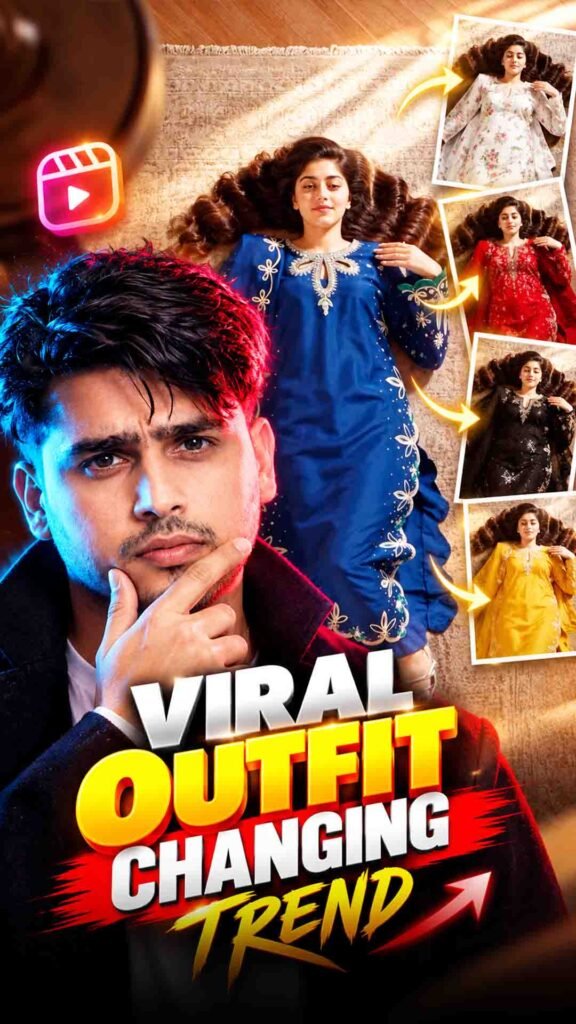
A new AI Outfit Changing Video trend is going viral on Instagram! 🤯 In this trend, you can transform a normal video into a stylish outfit-changing video using AI.
The best part is that you can create multiple outfit looks in one video without recording separate clips for every outfit.
With Google Flow, you can try transforming your original video while keeping your body movement, camera position, and background as consistent as possible.
In this guide, you will learn how to create the New Viral Outfit Changing Trend step by step.
New Viral Outfit Changing Prompt 👗
Prompt
Create a **photorealistic 10-second vertical 9:16 fashion video** featuring **one woman, one fixed camera, one continuous environment, and four different Indian outfits**.## CHARACTERUse the **uploaded image as the sole identity reference** for the woman.Maintain the exact same woman throughout:– Same face and facial structure – Same eyes, nose, lips and eyebrows – Same skin tone – Same body proportions and physique – Same hair colour, length and hairstyle – Same age appearance**Identity is permanently locked. Only the clothing changes.**Do not create another woman, duplicate character, different face, facial morphing or body transformation.—## WARDROBEThe uploaded image is for **identity only**.AI must independently create **four distinct, stylish, premium Indian fashion looks**.Suggested variety:1. Contemporary saree 2. Modern lehenga 3. Elegant Indian suit / salwar set 4. Sophisticated Indo-western Indian outfitThe exact colours, fabrics, prints and styling are up to the AI.Each outfit must look fully real, naturally worn and physically consistent.**Exactly four outfits. No fifth outfit.**—## SETA premium contemporary fashion interior:– Muted blue carpet – Curved blush-pink sofa partially visible on the left – Clean, minimal surroundings – Consistent lighting and environmentThe set never changes.—## CAMERAOne continuous **locked 90-degree overhead shot**.The camera points straight down at the woman.The camera never moves.No pan, tilt, zoom, dolly, orbit, rotation, reframing, lens change or cuts.Keep the woman’s full body inside the frame after she reaches the carpet.Head toward the top of frame, feet toward the bottom.—## FANA large polished **chrome ceiling fan** is physically positioned between the camera and the woman.The fan is close to the camera, while the woman is farther below.The fan has realistic chrome reflections, metallic highlights, blade brackets and natural motion blur.The fan begins stationary and then rotates **very slowly clockwise**.Use exactly **four clearly separated blade passes** during the 10-second video.The fan must never spin rapidly.—# MOST IMPORTANT: INVISIBLE OUTFIT CHANGEThe fan is **ONLY a natural foreground obstruction**.It is **NOT a visual transition effect**.When a fan blade passes in front of the woman, it temporarily blocks the camera’s view.**The outfit change happens completely while the woman is hidden from the camera.**The viewer must NEVER see the clothing change.The visual sequence must always be:**WOMAN VISIBLE IN CURRENT OUTFIT**→**FAN BLADE COMPLETELY BLOCKS THE WOMAN**→**WARDROBE CHANGES WHILE FULLY HIDDEN**→**FAN BLADE MOVES AWAY**→**SAME WOMAN IS ALREADY WEARING THE NEXT OUTFIT**This should feel like a **real practical hidden-camera fashion trick**, not an AI transition.—## CRITICAL OCCLUSION RULEThe woman’s clothing must be **fully hidden before the outfit changes**.Never change the clothing while any significant part of the outfit is visible.There must be no moment where the audience can see:– Old outfit changing into new outfit – Half-old / half-new clothing – Clothing moving across the body – A transition edge – A changing colour region – A moving clothing boundaryThe new outfit must appear **fully complete from the first frame in which it becomes visible**.—# ABSOLUTELY NO VISIBLE TRANSITIONDo NOT use or create:– Swipe effect – Wipe effect – Mask effect – Progressive reveal – Moving transition boundary – Morphing – Dissolve – Crossfade – Glitch – Flash – Digital transition – Clothing animation – Fabric transformation – Split outfit – Half-and-half clothing**Do not visually animate the wardrobe change.**The change occurs entirely during complete camera occlusion.—# OUTFIT CHANGE 1The woman starts in **Outfit 1**.The first slow fan blade crosses the foreground.Once the blade completely blocks her body:**Change Outfit 1 to Outfit 2 while she is completely hidden.**Do not show the change.When the blade clears:**The same woman is already fully wearing Outfit 2.**—# OUTFIT CHANGE 2Outfit 2 remains visible for a moment.The second slow fan blade crosses the foreground.Once the woman is completely hidden:**Change Outfit 2 to Outfit 3 while she is completely hidden.**When the blade clears:**The same woman is already fully wearing Outfit 3.**—# OUTFIT CHANGE 3Outfit 3 remains visible.The third slow fan blade crosses the foreground.Once the woman is completely hidden:**Change Outfit 3 to Outfit 4 while she is completely hidden.**When the blade clears:**The same woman is already fully wearing Outfit 4.**—# FOURTH BLADE PASSThe fourth blade pass is purely cinematic.**Do not change the outfit.**Outfit 4 remains unchanged.The fan simply passes naturally in the foreground.Finish with Outfit 4 clearly visible.—# ACTION
How to Create the AI Outfit Changing Video Using Google Flow
Follow these simple steps to create your own outfit transformation video.
Step 1: Open Google Flow
First, open Google Flow and sign in using your Google account.
Go to the video generation section and check which video upload and editing features are available in your account.
Step 2: Upload Your Original Video
Choose the video in which you want to create the outfit-changing effect.
For better results, use a video where:
- Your full body or outfit is clearly visible.
- Your face is easy to recognise.
- The camera movement is smooth.
- The lighting is good.
- The background is not too crowded.
Step 3: Copy the Outfit Changing Prompt
Copy your complete AI Outfit Changing Prompt from the section above.
This prompt will guide AI on how to change your outfit while maintaining your original appearance and video movement.
Step 4: Paste the Prompt into Google Flow
Paste the copied prompt into Google Flow along with your uploaded video.
Make sure your instructions clearly explain the outfit transformation you want.
Step 5: Generate Your Video
Click the Generate button and wait for Google Flow to process your video.
AI will use your original video and instructions to create an outfit transformation effect, depending on the available workflow.
Step 6: Check Your Final Result
Once the video is ready, watch it carefully.
Check whether the outfit changes naturally and whether your face, body position, background, and camera movement remain consistent.
Step 7: Try Different Outfit Styles
Want more variations? You can experiment with different outfit descriptions.
For example, try a casual outfit, formal suit, traditional dress, party wear, or luxury fashion look.
If the first generation does not look natural, try generating another version.
What Is the AI Outfit Changing Video Trend?
The AI Outfit Changing Trend is a video editing trend where artificial intelligence changes the clothes of a person in an existing video.
Instead of recording multiple videos with different outfits, you can use AI to create a visual transformation from your original footage.
Some popular features of this trend include:
- Multiple outfit looks: Try different clothing styles in one video.
- Natural movement: Maintain the original walking or body movement.
- Identity consistency: Keep your face and appearance as close to the original video as possible.
- Realistic clothing: Create natural-looking fabric, folds, and outfit details.
- Smooth transformation: Make the outfit change look like part of the original footage.
- Consistent background: Keep the original environment and camera angle.
The final quality depends on your source video, prompt, and the video generation features available.
Best Outfit Ideas to Try with AI
You can experiment with different fashion styles using this trend.
1. Casual Outfit Transformation
Change your normal clothes into a stylish casual look with jeans, a T-shirt, and sneakers.
2. Formal Outfit Transformation
Try a professional look with a blazer, formal shirt, trousers, and shoes.
3. Traditional Outfit Transformation
Experiment with traditional clothing such as sarees, lehengas, kurtas, or sherwanis.
4. Luxury Fashion Look
Create a premium fashion style with elegant outfits and a classy appearance.
5. Party Wear Transformation
Try stylish party outfits with modern designs and fashionable accessories.
Tips to Get Realistic AI Outfit Changing Results
Follow these simple tips to improve your video quality.
- Use a clear video: Make sure your body and outfit are clearly visible.
- Avoid excessive camera movement: Stable footage can make outfit changes easier to follow.
- Keep good lighting: Proper lighting helps AI understand clothing details.
- Describe outfits clearly: Mention the exact clothing style, colour, and design you want.
- Maintain your identity: Ask AI to preserve your face, hairstyle, and body appearance.
- Keep movements natural: Avoid videos with very fast or confusing movements.
- Try multiple generations: Different generations may produce different results.
- Check every frame: Look for changes in your face, hands, clothing, and background.
Remember that AI may sometimes create unwanted changes in your appearance or clothing. Always review the final video before posting it.
Can You Create an AI Outfit Changing Video for Free?
You may be able to try this trend using Google Flow’s available free access, depending on your account and current usage limits.
Free credits, video generation limits, and available features can change over time. Check your account before starting, as some features may require paid access.
Frequently Asked Questions (FAQs)
1. What is the AI Outfit Changing Video Trend?
It is an AI video editing trend that changes a person’s clothes in an existing video while attempting to maintain the original movement and appearance.
2. Can I create an outfit-changing video using Google Flow?
You can try this effect using Google Flow’s available video generation or video editing features. The exact workflow depends on the features available in your account.
3. Do I need to record a new video for every outfit?
No. The idea of this trend is to use one original video and create different outfit variations with AI.
4. Can I change multiple outfits in one video?
You can experiment with multiple outfit descriptions and generate different versions. The ability to create several changes in one continuous video depends on the workflow and its limitations.
5. How can I keep my original face unchanged?
Use a clear source video and clearly instruct AI to preserve your facial features, hairstyle, and identity. However, exact identity preservation is not guaranteed.
6. Which video is best for this trend?
A clear video with good lighting, visible clothing, and smooth body movement is generally a better choice.
7. Can I upload the final video to Instagram Reels?
Yes. You can share your AI outfit transformation video on Instagram Reels, provided it meets your preferred video format and quality.
Final Words
The New Viral Outfit Changing Trend is a creative way to experiment with fashion using AI.
With Google Flow, your original video, and the right prompt, you can try different outfits without recording separate videos for every look.
Whether you want a casual, formal, traditional, or luxury fashion style, this trend gives you a fun way to create unique fashion content.
Try it with your own video and create your favourite outfit transformation! 👗✨