Viral Eye Photo Trend Prompt: Create a Cinematic AI Eye Portrait
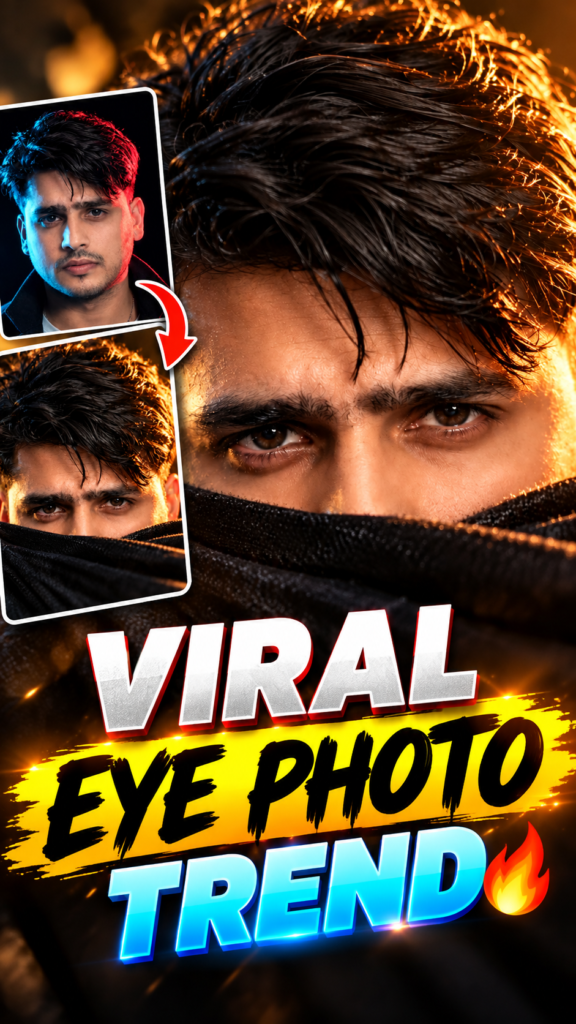
Have you seen the viral eye photo trend on Instagram? People are using AI to turn their normal photos into cinematic portraits with dramatic lighting, realistic skin texture, and a mysterious look.
The best part is that you can try this trend using your own photo. You do not need a professional camera or any photo editing skills. You just need a clear photo and a good AI prompt.
In this post, you will learn how to create the Viral Eye Photo Trend using ChatGPT. Follow the simple steps below to create your own cinematic eye-focused portrait.
Viral Eye Photo Trend Prompt
Copy the prompt below and use it in ChatGPT along with your photo.
Copy and Paste Prompt:
Prompt
Use the uploaded photo as the ONLY identity reference. Preserve the person’s exact facial identity, natural facial proportions, eye shape, eyebrows, skin tone, hairstyle, and overall appearance. Do not change the person’s gender, age, or recognizable features.Transform the photo into an extreme cinematic close-up portrait, vertical 9:16. Show only the upper half of the face, with the eyes as the main focus. The lower half of the face is naturally hidden behind a dark black cloth, scarf, sweater, or similar fabric pulled up to just below the eyes/nose area.Keep the subject looking directly into the camera with an intense, soulful, mysterious expression. Preserve natural eye color and add sharp realistic catchlights. Maintain authentic skin texture, pores, subtle imperfections, and realistic facial details — no plastic skin, excessive retouching, or artificial beauty filters.Hair should look naturally messy and slightly wet, with individual strands falling organically around the forehead and sides of the face. Warm golden-hour sunlight comes strongly from one side, creating beautiful golden-orange rim light through individual hair strands and subtle highlights along the face.Use dramatic low-key cinematic lighting with warm amber highlights and deep natural shadows. Create a softly blurred cinematic background with strong shallow depth of field.Shot as if on an 85mm portrait lens at f/1.4, realistic optical depth, natural bokeh, subtle film grain, realistic exposure, authentic camera imperfections, premium editorial photography, photorealistic skin, cinematic color grading, rich dark-brown, black and amber tones.Composition should be intimate and dramatic, with the eyes positioned prominently near the center of the frame. The image should feel mysterious, emotional, premium, and Instagram-trending while still looking like a real photograph.Do not alter the person’s identity. Do not beautify or masculinize/feminize the face. Do not change facial structure. Do not add makeup, jewelry, facial hair, or accessories that are not present in the reference photo.Final output: ultra-realistic cinematic portrait, vertical 9:16, extremely detailed eyes, natural skin texture, realistic hair strands, dramatic golden rim lighting.
Important: The complete image-generation prompt needs to be added to the box above. The steps below explain how to use it correctly.
What Is the Viral Eye Photo Trend?
The Viral Eye Photo Trend is an AI photo-editing trend where a normal portrait is transformed into a dramatic, cinematic image that focuses on the eyes.
The image usually has golden lighting, deep shadows, realistic skin details, and a close-up camera angle. These details make the portrait look like a scene from a movie.
Instead of showing the full face clearly, the image draws attention to the eyes and the surrounding facial details. This creates a mysterious and stylish look.
You can try this trend with your own photo and share the result on Instagram, WhatsApp, or other social media platforms.
How to Create the Viral Eye Photo Trend Using ChatGPT
Follow these simple steps to create your AI eye portrait.
Step 1: Open ChatGPT
First, open ChatGPT on your phone or computer.
Make sure you are using a version that supports image uploads and image generation or editing.
Step 2: Upload Your Photo
Upload a clear photo of yourself.
For the best result, choose a photo where your face is visible and the eyes are easy to see. A front-facing photo can be a good choice because it gives the AI a clear reference.
Avoid photos that are too blurry, too dark, or heavily filtered.
Step 3: Copy the AI Prompt
Copy the complete Viral Eye Photo Trend prompt from the prompt box above.
The prompt tells the AI how to transform your photo into a cinematic portrait.
It can describe details such as golden lighting, realistic skin texture, a close-up composition, dramatic shadows, and a premium camera look.
Step 4: Paste the Prompt Into ChatGPT
Open your ChatGPT conversation and paste the copied prompt.
Make sure your uploaded photo is included in the same request. The AI should use that photo as the identity reference for the edited portrait.
Step 5: Generate Your Image
Ask ChatGPT to generate the image using your uploaded photo and the prompt.
For a vertical social media image, request a 9:16 aspect ratio.
The result should focus on the eyes and create the cinematic style described in your prompt.
Step 6: Check the Final Result
After the image is generated, check whether the eyes, skin texture, lighting, and facial features look natural.
If the result does not look right, you can ask ChatGPT to try again while keeping your original photo as the identity reference.
You can also request small improvements, such as more natural skin texture or softer golden lighting.
Tips for Getting a Better AI Eye Portrait
Here are some simple tips that can help you get a better result.
1. Use a Clear Photo
Your original photo is important because the AI uses it to understand your facial features.
Choose a sharp image with clearly visible eyes.
2. Keep Your Face Natural
Avoid using a photo with too many filters or effects. A natural image can give the AI a better reference for your facial features.
3. Focus on the Eyes
The eyes are the main part of this trend. If the first result does not highlight them properly, ask the AI to create a closer crop with more attention on the eyes.
4. Try Cinematic Golden Lighting
Golden lighting can give the portrait a warm, dramatic appearance.
If the image looks too bright, ask for softer highlights and deeper shadows while keeping the skin texture realistic.
5. Avoid Too Much Smoothing
AI images can sometimes make skin look overly smooth or artificial.
If this happens, ask for natural pores, realistic skin texture, and fewer beauty filters.
6. Keep Your Identity Consistent
If you want the image to look like you, ask the AI to preserve your original facial features, eye shape, and other identifying details.
AI editing may not reproduce every feature perfectly, so check the result before sharing it.
How to Make the Image in Instagram Reels Size
If you want to post your result as an Instagram Reel cover or Story, use a vertical image format.
The recommended dimensions are:
- Aspect ratio: 9:16
- Image size: 1080 × 1920 pixels
- Style: Cinematic and realistic
- Main focus: Eyes and facial details
You can mention these requirements in your prompt. However, the actual output dimensions may vary depending on the image-generation tool.
If the generated image has a different size, you can crop it to fit your preferred format.
Can You Create the Viral Eye Photo Trend on Your Phone?
Yes! You can try this trend using ChatGPT on your smartphone, as long as your account and app version support the required image features.
You do not need a computer or professional editing software.
Simply upload your photo, paste the complete prompt, and generate the image. Once you are happy with the result, save it and share it on your favourite social media platform.
Frequently Asked Questions
1. What is the Viral Eye Photo Trend?
It is an AI photo trend that transforms a normal portrait into a cinematic image with dramatic lighting, realistic skin texture, and a strong focus on the eyes.
2. Can I create this trend using ChatGPT?
Yes, you can try it using ChatGPT if image upload and image generation or editing are available in your account.
3. Do I need two photos for this trend?
No. This trend can be created using just one clear photo of yourself as the identity reference.
4. Which photo is best for this AI trend?
A clear photo with visible eyes and natural facial details is a good choice. Avoid blurry images and photos with heavy filters.
5. Can I create the image in 9:16 format?
You can request a 9:16 vertical image in your prompt. The exact output size may depend on the tool, so you might need to crop the image afterward.
6. Why does my AI image look different from my original photo?
AI image editing can sometimes change facial details, skin texture, or eye shape. Try using a clearer photo and explicitly ask the AI to preserve your original facial features.
7. Can I post the generated image on Instagram?
Yes, you can share your image on Instagram. Before posting, check that the image looks correct and that you have permission to use any photo belonging to another person.
Final Words
The Viral Eye Photo Trend is a simple way to turn an ordinary portrait into a cinematic AI image.
With a clear photo and a well-written prompt, you can experiment with dramatic golden lighting, realistic skin texture, and a close-up eye-focused look.
Follow the steps in this guide, try the prompt, and see how your portrait turns out. If the first result is not what you expected, make small changes to the instructions and try again.
Have fun creating your own cinematic eye portrait!